Introduction
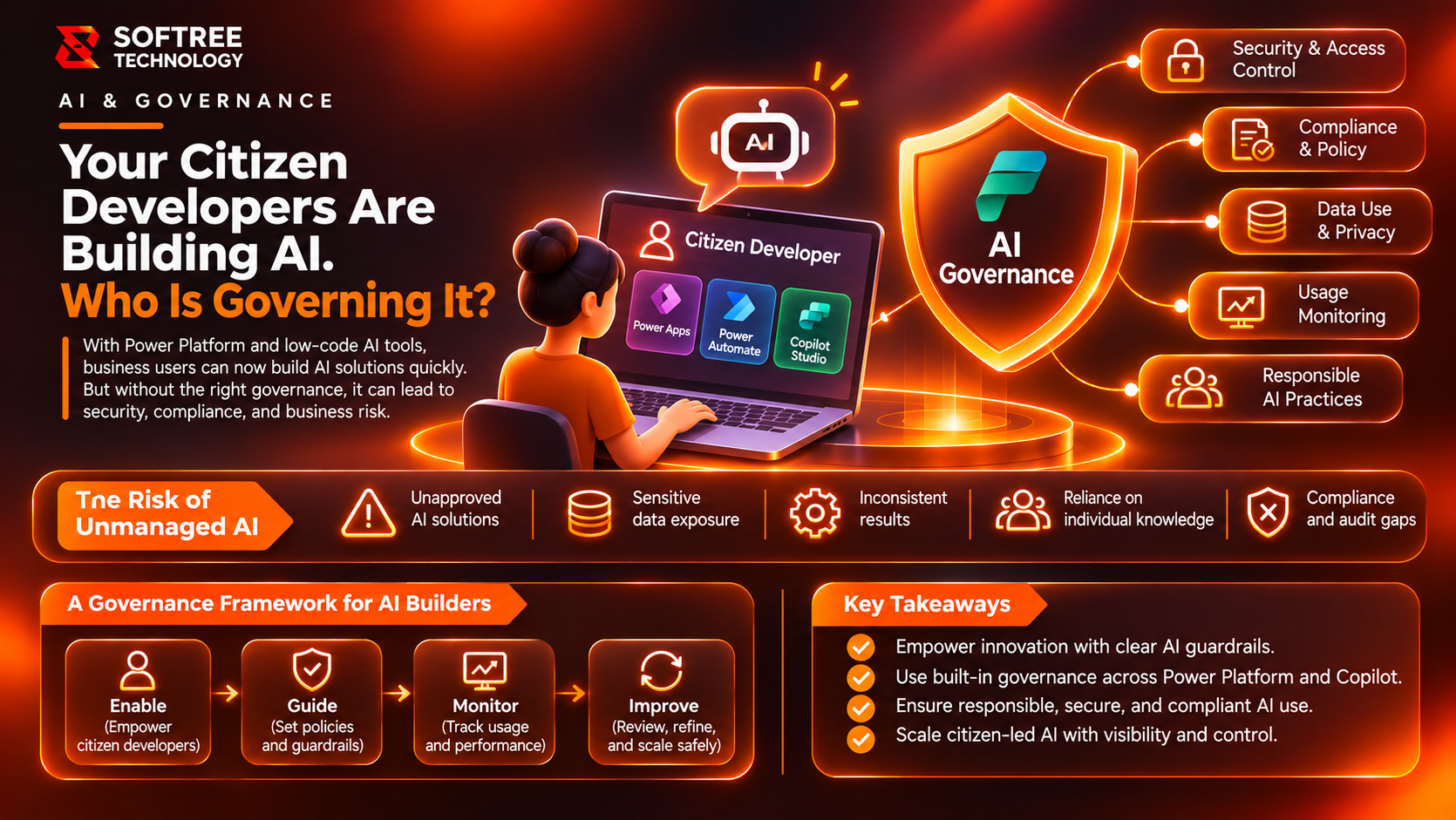
Citizen developers are no longer building only forms, apps and simple workflows. With AI capabilities across Microsoft Power Platform, they can create copilots, intelligent workflows and agent-powered experiences that interact with business data.
This creates a governance challenge: how can organizations enable employees to experiment with AI without exposing sensitive information, creating uncontrolled agents or introducing business risk?
Power Platform AI governance provides the answer through a combination of environment strategy, data protection, access controls, monitoring and a Center of Excellence (CoE). The objective is controlled innovation—not stopping citizen developers from building.
What Is Power Platform AI Governance?
Power Platform AI governance is the combination of policies, technical controls and organizational processes used to manage who can build AI solutions, what data they can access, and how those solutions are tested, published and monitored.
It allows employees to innovate while IT maintains control over security, compliance, environments and production releases.
How Power Platform AI Governance Works
A practical governance model separates experimentation from shared business applications and enterprise production agents.
The governance lifecycle includes five stages:
- Enable: Provide makers with approved environments and safe development tools.
- Protect: Apply connector policies, identity controls and data boundaries.
- Review: Assess security, business impact and solution quality.
- Publish: Move approved solutions through controlled release processes.
- Monitor: Track usage, ownership, operational health and policy compliance.
This approach allows organizations to support citizen development while maintaining appropriate oversight of AI-enabled applications.
Key Components of Power Platform AI Governance
Environment Strategy
Environments determine where applications, workflows and agents are created. Separate environments help distinguish experimentation from team development and production workloads.
Data Policies and DLP
Data Loss Prevention policies control connector usage and data movement. These policies help reduce accidental exposure and prevent unauthorized connections between business and external data sources.
Identity and Access Controls
Maker, user and administrator permissions determine who can create, access, manage and publish solutions. Appropriate identity controls help prevent unauthorized access to business information.
Copilot Studio Governance
Copilot Studio controls help manage agent publishing, channels and knowledge sources. These controls determine how agents are exposed and which information they can use.
Application Lifecycle Management
Application Lifecycle Management (ALM) supports testing, deployment, versioning and controlled releases. It makes production changes more predictable and easier to manage.
Monitoring and Inventory
Monitoring helps administrators understand ownership, usage and operational health. Inventory visibility can identify unmanaged, inactive or potentially risky applications and agents.
Real-World Example: A Department Builds Its Own AI Agent
Imagine a sales department creating a Copilot Studio agent to answer questions about customer records, sales policies and pricing.
The agent can improve access to business information, but several governance questions arise:
- Can every employee access the agent?
- Which Dataverse records can it retrieve?
- Can it use external knowledge sources?
- Who approves its release?
- How will its usage and changes be monitored?
A governed implementation follows this process:
- The sales team builds the agent in an approved environment.
- The agent connects to approved data sources.
- Access and DLP rules are applied.
- IT and business stakeholders review security and answer quality.
- The agent receives approval for publication.
- It is released to approved users.
- Usage and changes are monitored.
The department retains the ability to innovate, while IT defines data boundaries, publishing requirements and operational ownership.
When to Use Centralized Governance and When to Allow Maker Freedom
Not every AI application requires the same level of control. Risk-based governance helps organizations balance innovation with security.
Use stronger governance when:
- Agents access customer, financial, employee or confidential data.
- Solutions are shared across departments or external audiences.
- AI can trigger business transactions or modify records.
- Applications support critical business processes.
Allow more maker autonomy when:
- Agents are used for personal productivity or experimentation.
- They use approved information the maker is authorized to access.
- They have limited permissions and perform no sensitive business actions.
- They remain isolated from production systems.
Applying a single restrictive policy to every maker can slow adoption. Risk-based controls provide a more practical governance approach.
Recommended Architecture: Three Governance Zones
A three-zone model helps organizations scale AI development without treating every experiment as an enterprise application.
Zone 1: Citizen Development
This zone supports personal productivity and experimentation.
Recommended characteristics include safe defaults, limited access and private usage. Makers can explore approved capabilities without unrestricted production access.
Zone 2: Team Development
This zone supports departmental applications and agents.
Solutions use approved environments and undergo testing and review before being shared more broadly.
Zone 3: Professional Development
This zone supports enterprise-critical agents and applications.
IT ownership, stronger security controls, application lifecycle management and formal release procedures help prepare solutions for production.
The three zones establish a progression from experimentation to governed production deployment.
Power Platform Admin Center and the Center of Excellence
The Power Platform admin center provides centralized visibility and governance capabilities for environments, data policies, inventory, usage and operational insights.
A Center of Excellence combines people, processes, standards and technology to support makers and coordinate governance across an organization.
Microsoft states that the CoE Starter Kit is no longer actively maintained, although it remains available for existing and new deployments. Organizations should prioritize current Power Platform admin center capabilities when planning their governance approach.
Power Platform AI Governance Checklist
Before releasing an AI-enabled application or agent, verify the following:
- Define who can create apps, flows and AI agents.
- Establish separate development, test and production environments.
- Apply tenant-level and environment-level data policies.
- Restrict unapproved connectors and knowledge sources.
- Configure identity, permissions and sharing rules.
- Require reviews for business-critical agents.
- Establish testing and release procedures.
- Track ownership, usage and inactive solutions.
- Monitor agent activity and security posture.
- Assign responsibility for ongoing governance.
Conclusion
Citizen development can accelerate business innovation, but AI introduces additional responsibilities around data access, security and operational oversight.
Power Platform AI governance enables organizations to support citizen developers while maintaining control over environments, agents, data and production releases.
Softree Technology helps organizations establish Power Platform governance frameworks, secure AI-enabled applications and build scalable environments that support citizen developers and IT teams.
Want to scale citizen-built AI without creating governance gaps? Explore Power Platform governance at Softree Technology.
https://www.softreetechnology.com/services/offshore-power-platform-development