Introduction
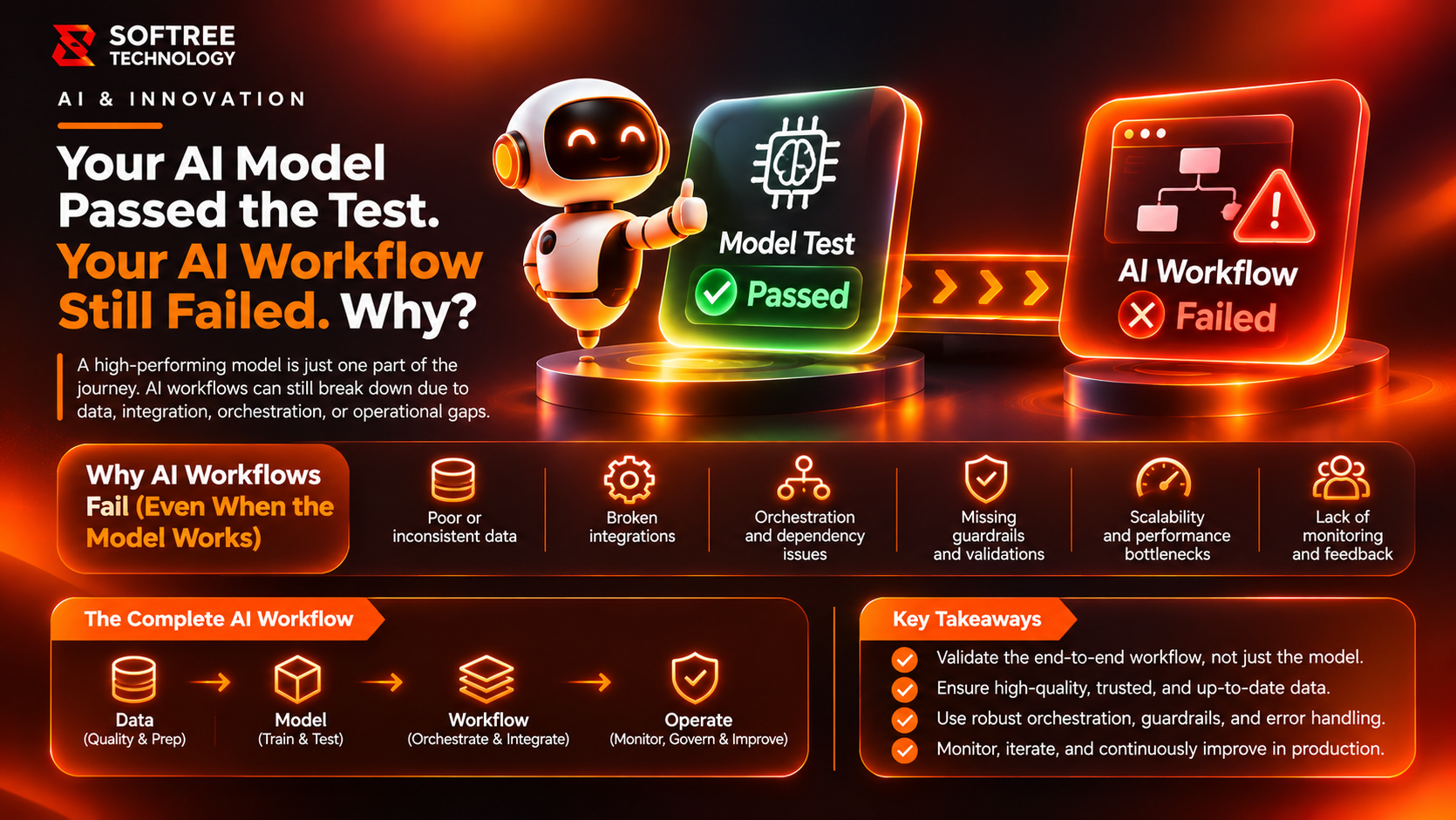
An AI model answers a test prompt accurately in a controlled environment. The team approves it and releases an automated workflow. A week later, users report missing updates, incorrect records and tasks that never reach the right queue.
What happened? The model may have passed its evaluation, but the workflow includes much more than the model. It also depends on prompts, orchestration, tools, APIs, data, business rules, permissions, retries and downstream systems.
A reliable release therefore requires AI workflow testing, not just model testing. Testing the complete process helps identify failures that individual model evaluations cannot detect.
Key Takeaways
- Model testing evaluates individual AI behavior, while workflow testing validates complete business processes.
- Correct model responses do not guarantee successful integrations or business outcomes.
- Tool calls, permissions, retries, state transitions and human approvals require dedicated testing.
- End-to-end testing helps identify failures across connected systems.
- Risk-based regression testing maintains reliability after changes to prompts, models or configurations.
Model Testing Versus Workflow Testing
Model testing evaluates how an AI model behaves in response to inputs. Common evaluation criteria include relevance, factuality, instruction following, safety and consistency.
Workflow testing evaluates the complete business process, from the initial trigger to the final outcome.
For example, an AI-powered support automation may classify a ticket correctly but still fail because it extracts the wrong customer ID, sends an invalid API payload or closes the ticket before human review is complete.
A passing model score is useful evidence, but it cannot prove that the integrated process is dependable.
Where AI Workflows Commonly Fail
AI workflows combine probabilistic model behavior with deterministic systems, integrations and business logic. Failures can originate from several areas:
- Trigger and input failures: Events arrive twice, required fields are missing or source data is outdated.
- Prompt and context failures: Instructions conflict, relevant context is omitted or prompt changes alter behavior.
- Decision failures: The model selects the wrong route, confidence is treated as certainty or a business rule is bypassed.
- Tool and API failures: Tools receive malformed arguments, credentials expire, rate limits are reached or external services become unavailable.
- State and memory failures: Context is lost between steps, stale information is reused or data is associated with the wrong case.
- Exception-handling failures: Timeouts, partial completion and retries create duplicate or inconsistent actions.
- Human handoff failures: Escalation does not trigger, reviewers lack context or the workflow continues before approval.
- Output and audit failures: Final records are incomplete, explanations are misleading or activities cannot be traced.
Identifying these failure categories helps QA teams design targeted test scenarios instead of relying exclusively on model accuracy.
A Complete AI Workflow QA Approach
1. Map the End-to-End Process
Document the trigger, inputs, model calls, decision points, tools, integrations, data changes, human approvals and final business outcome.
Identify which steps are deterministic and which are probabilistic. This provides a clear understanding of where testing is required.
2. Define Workflow-Level Acceptance Criteria
Specify what must happen, what must never happen and what constitutes a safe failure.
For example, instead of checking only whether a model returns the expected ticket category, validate whether the correct ticket reaches the correct queue with the appropriate status and ownership.
3. Test Prompts and Context
Use representative and difficult inputs, including incomplete requests, contradictory details, long conversations, irrelevant content, unusual wording and prompt-injection attempts.
Verify that the workflow supplies the appropriate context and that the model follows its intended task boundaries.
4. Validate Tool Selection and Arguments
Confirm that the correct tool is selected and that required fields, values and formats are valid.
Test invalid arguments, unavailable tools, timeouts, rate limits and authentication failures. Also verify that tools are called only when permitted.
5. Verify Business Rules and State Transitions
Check thresholds, routing conditions, approval gates, status changes and data persistence.
Confirm that the workflow cannot skip mandatory controls simply because a model response appears confident.
6. Test Integrations and Recovery
Simulate slow or unavailable services, partial responses, duplicate events and interrupted runs.
Verify bounded retries, idempotency, clear error states and safe recovery. A retry must not accidentally create a second payment, ticket or customer record.
7. Validate the Final Outcome
Compare resulting records and actions with expected business results.
Check content quality, completeness, permissions, audit logs and user-visible messages. After fixing a defect, retest the complete journey rather than only the individual component.
Example: AI-Powered Customer Support Workflow
Imagine a workflow that reads an incoming support email, classifies the issue, retrieves customer information, drafts a response and routes the case.
A practical test should verify that:
- Email triggers handle attachments, missing fields and duplicate delivery.
- Classification works across common categories and confusing edge cases.
- Customer lookup uses a stable identifier without mixing records.
- Responses use approved knowledge and do not invent policies or account details.
- High-risk cases reach a human reviewer and cannot be automatically closed.
- API failures do not lose cases or create duplicate updates.
- Final tickets contain the correct category, owner, status and conversation history.
The model can classify an email perfectly while the workflow still updates the wrong customer record. This is why outcome-based testing matters.
Build a Risk-Based Test Suite
A practical AI workflow test suite should combine several testing levels:
- Component testing: Validate prompts, model responses, tool wrappers and individual decision rules.
- Integration testing: Test model-to-tool, tool-to-API and workflow-to-system interactions.
- End-to-end testing: Validate complete journeys from trigger through final outcome.
- Negative testing: Test malformed inputs, unauthorized requests, prompt injection and prohibited actions.
- Resilience testing: Simulate timeouts, service outages, retries, duplicate events and partial completion.
- Regression testing: Rerun previously passing scenarios after prompt, model, code, data or configuration changes.
Maintain a versioned dataset of test inputs and expected outcomes. Because model responses can vary, define acceptable criteria where exact wording is unnecessary.
Evaluate factual and operational correctness rather than superficial similarity to a reference sentence.
Conclusion
An AI model is one component in a larger system. Even a strong model can participate in a failed workflow when context is missing, a tool call is incorrect, an integration is unavailable or a business control is skipped.
Effective AI workflow testing follows the complete journey, verifies real outcomes and deliberately tests failure conditions.
Move beyond “the model passed” to “the workflow is safe, reliable and ready for users.”
Softree Technology can help teams strengthen QA across AI-enabled applications, integrations and automated business processes.
https://www.softreetechnology.com/