Introduction
Power BI teams often face a trade-off between performance, data freshness, and storage duplication. Import mode delivers responsive reporting but requires data refreshes and maintains a separate analytical copy. DirectQuery accesses source data at query time, but report responsiveness depends on the source system and query path.
Direct Lake in Microsoft Fabric addresses this challenge by allowing Power BI semantic models to analyze data stored in OneLake without maintaining a separate imported copy. It combines OneLake-backed storage with an analytical query experience, making it an important option for modern Fabric architectures.
However, Direct Lake is not automatically the best choice for every workload. Data quality, semantic model design, capacity, security, and performance testing remain essential.
Key Takeaways
Direct Lake is a Power BI semantic-model storage mode designed for analytical data stored in OneLake. It can reduce data duplication and refresh overhead while supporting interactive reporting. Its effectiveness depends on curated Delta tables, a well-designed semantic model, appropriate Fabric capacity, and validated security. Import and DirectQuery remain suitable for workloads with different requirements.
What Is Direct Lake in Microsoft Fabric?
Direct Lake allows Power BI semantic models to work directly with data stored in OneLake, typically in Delta tables within a Fabric lakehouse or warehouse.
Instead of maintaining a separate imported analytical copy, the semantic model accesses the required data through the Direct Lake query path.
This approach is particularly useful when organizations already maintain curated analytical data in Microsoft Fabric and want to build Power BI reporting on top of it.
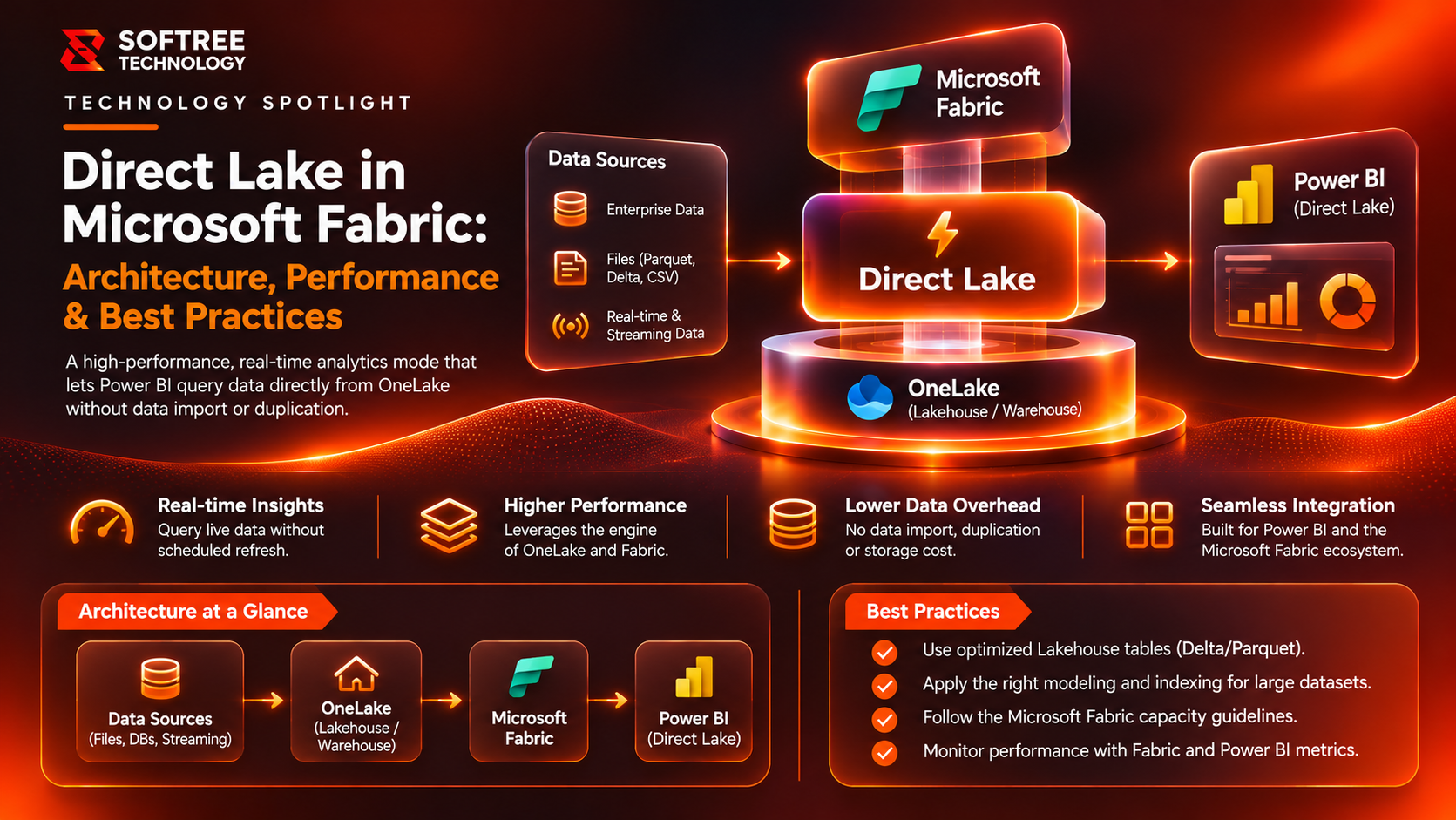
How Direct Lake Architecture Works
A typical Direct Lake architecture contains four layers:
- Data Engineering: Ingests, transforms, and validates source data.
- OneLake: Stores curated Delta tables for analytical consumption.
- Semantic Model: Defines relationships, measures, metadata, and security.
- Power BI: Provides reports, dashboards, and interactive analysis.
When a user interacts with a Power BI visual:
- Power BI sends a DAX query to the semantic model.
- The model identifies the required tables and columns.
- The Direct Lake engine accesses the relevant OneLake data.
- Column data can be loaded into memory to support analytical processing.
- The query result is returned to Power BI for visualization.
The architecture reduces unnecessary data movement while keeping the analytical model separate from the underlying storage layer.
Direct Lake vs Import
Import remains appropriate for smaller datasets, predictable refresh schedules, or models requiring features best supported by Import.
Direct Lake is attractive when data already exists in OneLake, grows significantly, or requires reducing duplicate analytical storage.
Direct Lake vs DirectQuery
DirectQuery is useful when data must remain in an external source or source-side query behavior is essential.
Direct Lake is a strong candidate when data is curated in Fabric and organizations want interactive Power BI analysis without sending every report interaction to an external database.
When Should You Use Direct Lake?
Direct Lake should be evaluated when:
- Analytical data is already stored in a Fabric lakehouse or warehouse.
- Power BI reports operate over large or growing datasets.
- Maintaining separate imported copies creates refresh or storage overhead.
- Data engineering and BI teams can manage the OneLake tables, semantic model, and Fabric capacity together.
Consider Import or DirectQuery when:
- Data is not in OneLake and moving it into Fabric adds unnecessary complexity.
- The model requires functionality unavailable in the selected Direct Lake configuration.
- Source-specific query behavior or freshness requirements favor DirectQuery.
- A smaller Import model already satisfies performance and operational requirements.
The right decision depends on workload requirements rather than the storage mode alone.
Real-World Technical Example: Retail Analytics on OneLake
Consider a retailer consolidating point-of-sale transactions, online orders, and product reference data into a Fabric lakehouse.
The analytics team needs reporting across regions, stores, channels, product categories, sales, margins, and inventory. As transaction volumes increase, maintaining separate imported copies across multiple reports introduces refresh overhead.
A proposed Direct Lake architecture could follow this workflow:
POS and E-commerce Data → Fabric Data Pipelines → Curated Delta Tables → Direct Lake Semantic Model → Power BI Reports
The semantic model could include:
- FactSales: sales transactions, quantities, revenue, and cost
- DimDate: calendar and fiscal periods
- DimProduct: SKU, category, and brand
- DimStore: store, region, and store type
- DimChannel: sales channel information
Before production, the team should validate:
- Daily sales totals against source-system control totals.
- Regional row-level security using store and head-office identities.
- Report response times for common and high-cardinality queries.
- Capacity consumption under realistic concurrent usage.
This approach supports governed reporting over OneLake without requiring a separate imported analytical copy for every report.
Direct Lake Performance Best Practices
Optimise the OneLake Data Layer
- Publish curated Delta tables instead of exposing raw landing data.
- Avoid excessive small files through appropriate compaction and maintenance.
- Choose partitioning based on workload and data volume.
- Maintain stable schemas and coordinate schema changes with model owners.
Optimise the Semantic Model
- Prefer a star schema where appropriate.
- Remove unused columns and tables.
- Use reusable DAX measures for shared business logic.
- Review relationships, date dimensions, and calculation complexity.
- Apply row-level security deliberately.
Optimise Power BI Reports
- Avoid unnecessary visuals and cross-highlighting.
- Use Performance Analyzer to identify expensive visuals.
- Review DAX query behaviour.
- Test slicers, drill-through, and common user journeys.
Monitor Fabric Capacity
Fabric capacity is shared across workloads. Data engineering, semantic-model queries, and other activities can compete for resources.
Establish performance baselines and test realistic concurrency before production. Monitor capacity utilisation, throttling signals, query responsiveness, and data publication behaviour.
Security, Governance, and Production Readiness
Direct Lake does not replace the organisation's security or governance model.
A production implementation should include:
- Least-privilege workspace and item permissions.
- Validated row-level security where users require different data access.
- Sensitive-data classification and controlled exposure of columns.
- Data lineage from source systems through OneLake to semantic models.
- Schema-change management and data-quality validation.
- Separate development, testing, and production environments.
- Monitoring, alerting, deployment, and rollback procedures.
Always validate current Microsoft Fabric documentation for supported features, security behaviour, and configuration-specific limitations.
What We Learned
Direct Lake is most effective when the entire analytics path is designed together.
Practical lessons include:
- Storage mode alone does not guarantee performance.
- Curated Delta tables provide a more reliable foundation than raw ingestion data.
- Semantic model design directly influences usability and performance.
- Security must be validated across workspaces, data sources, and reports.
- Capacity and concurrency should be tested under realistic workloads.
- Import and DirectQuery remain valuable options for workloads that do not fit Direct Lake.
The goal is not simply to adopt Direct Lake. It is to build a governed analytics architecture that meets business reporting requirements.
Next Steps
Before implementing Direct Lake, assess your existing Power BI models, Fabric data architecture, data freshness requirements, and reporting workloads.
A practical implementation plan should:
- Profile source data and analytical workloads.
- Curate and validate Delta tables in OneLake.
- Design the semantic model and security.
- Confirm required Direct Lake capabilities.
- Benchmark reports and concurrent workloads.
- Establish monitoring and operational ownership.
Softree Technology helps businesses design Microsoft Fabric architectures, develop Power BI semantic models, and modernize analytics platforms with governed, production-ready data engineering.
Planning a Direct Lake implementation? Explore Softree's Microsoft Fabric engineering services to build a scalable foundation for Power BI analytics.
https://www.softreetechnology.com/