Introduction
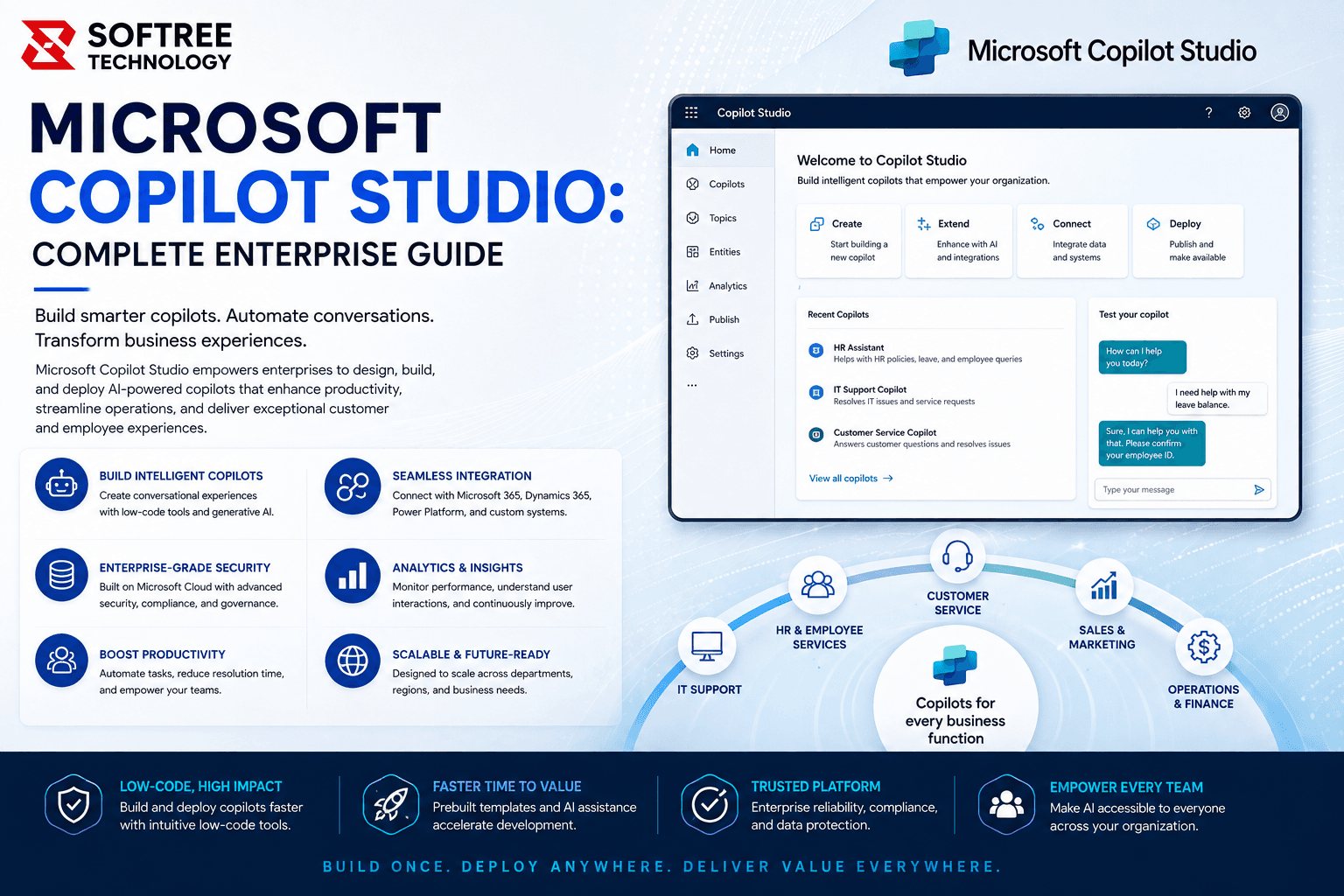
AI agents are becoming an important part of enterprise automation, helping organizations move beyond traditional chatbots toward systems that can understand requests, use business knowledge, and complete tasks. Microsoft Copilot Studio provides a low-code environment for building and managing AI-powered agents and workflows that can connect with organizational data and business systems.
For businesses already using Microsoft technologies, Copilot Studio can provide a practical way to introduce AI into employee support, customer service, operations, IT, HR, and other business processes. Agents can work across channels such as Microsoft Teams, Microsoft 365 Copilot, websites, and other supported experiences.
This guide explains what Microsoft Copilot Studio is, how it works, its key capabilities, common enterprise use cases, implementation approach, and best practices for building reliable AI agents.
Quick Answer
Microsoft Copilot Studio is a graphical, low-code platform for building AI agents and workflows. Organizations can create agents using natural language, connect them to business knowledge and data sources, add tools and workflows, test their behavior, and publish them to the channels where users already work.
The key value for enterprises is the ability to combine conversational AI with business processes. Instead of only answering questions, an agent can use connected tools and workflows to retrieve information, support tasks, and help automate business operations.
Table of Contents
- What Is Microsoft Copilot Studio?
- Why Is Microsoft Copilot Studio Important?
- How Does Microsoft Copilot Studio Work?
- Key Features of Microsoft Copilot Studio
- Microsoft Copilot Studio and AI Agents
- Connecting Copilot Studio With Business Data
- Copilot Studio Workflow Automation
- Common Enterprise Use Cases
- How to Build an AI Agent
- Best Practices
- Common Mistakes to Avoid
- Key Takeaways
- Conclusion
What Is Microsoft Copilot Studio?
Microsoft Copilot Studio is a graphical, low-code studio for building and managing AI-powered agents and workflows. It allows organizations to create agents, connect them to business information, configure tools and actions, and publish them across supported channels.
An agent can handle conversations, understand user requests, use connected knowledge sources, and perform tasks using configured tools. Organizations can create an agent by describing what they want it to do in natural language and then refine, test, and publish the resulting experience.
Copilot Studio also supports workflows that can automate repetitive tasks and integrate applications and services. These workflows can operate independently or be triggered by an agent as part of a larger business process.
Why Is Microsoft Copilot Studio Important?
Enterprise employees and customers often need information that is distributed across documents, applications, websites, knowledge bases, and business systems. Traditional processes may require users to search through multiple sources or contact another team before completing a simple request.
Copilot Studio can provide a conversational layer over these processes. Users can communicate with an agent in natural language while the agent uses configured knowledge and tools to provide information or support an action. This can make business processes easier to access and reduce repetitive interactions.
The platform is also relevant to organizations looking to scale AI adoption because its low-code approach allows business users and professional developers to participate in agent development without requiring every experience to be built from scratch.
How Does Microsoft Copilot Studio Work?
The process begins when a user submits a question or request. Copilot Studio uses AI and natural-language understanding to interpret what the user is asking and determine how the agent should respond.
The agent can then use configured topics, knowledge sources, tools, or workflows to handle the request. Generative AI capabilities can also help the agent retrieve and generate responses from connected knowledge sources without requiring makers to manually create a topic for every possible question.
When the request requires an action, the agent can use connected tools or workflows. A flow can perform an operation, interact with an application or service, and return the result to the agent.
The overall process can be represented as:
User Request → AI Understanding → Knowledge / Tool Selection → Workflow or Action → Response
This approach allows conversational experiences to become connected to real business processes instead of remaining limited to predefined answers.
Key Features of Microsoft Copilot Studio
AI Agent Creation
Copilot Studio provides a low-code approach to creating AI agents. Organizations can describe the purpose of an agent, provide instructions, connect knowledge sources, configure tools, and test the resulting experience before deployment.
This allows organizations to create focused agents for specific departments and business processes rather than developing a single generic chatbot for every requirement.
Generative AI
Generative AI capabilities can reduce the amount of manual configuration required when building agents. Copilot Studio supports generative answers and generative orchestration, allowing agents to use knowledge sources and select relevant topics, tools, agents, and knowledge at runtime.
This can help organizations create more flexible conversational experiences while reducing the need to manually define every possible user interaction.
Knowledge Integration
Agents can be connected to organizational knowledge and other data sources so they can provide responses based on relevant business information. Copilot Studio supports connections to data sources through prebuilt and custom connectors.
This is particularly useful for scenarios involving internal policies, product documentation, support information, employee resources, and other business content.
Workflow Automation
Copilot Studio includes flows that can automate repetitive tasks and integrate applications and services. A flow can be triggered by an event, an agent, or other automation, allowing conversational interactions to connect with operational processes.
Multi-Channel Deployment
Agents can be published across multiple supported channels, including Microsoft Teams, Microsoft 365 Copilot, websites, mobile applications, and other channels supported by the platform.
This allows organizations to bring the same AI capabilities closer to where employees and customers already work.
Microsoft Copilot Studio and AI Agents
AI agents differ from traditional rule-based chatbots because they can use AI to interpret natural-language requests and determine an appropriate response or action. Copilot Studio agents combine instructions, context, knowledge, tools, and triggers to handle conversations and tasks.
For example, an IT support agent could understand an employee's description of a technical problem, search approved support information, provide troubleshooting guidance, and trigger a support workflow when human assistance is required.
The level of autonomy should be determined by the business process. Routine, low-risk activities may be suitable for automation, while sensitive operations should include appropriate controls, validation, and human involvement.
Connecting Copilot Studio With Business Data
Enterprise AI agents are only as useful as the information they can reliably access. Organizations should identify the business data required for each use case and determine which sources should be connected to the agent.
Copilot Studio supports prebuilt and custom connectors for connecting with other data sources and services. This allows organizations to build agents that can work with existing applications and information instead of creating isolated AI experiences.
Organizations should also maintain clear ownership of knowledge sources. Outdated or inconsistent information can affect the usefulness of an agent, so business content should be reviewed and maintained as part of the overall AI implementation.
Copilot Studio Workflow Automation
The combination of AI agents and workflows is one of the important capabilities of Copilot Studio. An agent can understand what a user wants, while a workflow can handle the operational steps required to complete the request.
For example, an employee could ask an HR agent about a leave policy. The agent can provide the relevant information and then help initiate the appropriate process. Similarly, an IT support agent could understand an issue, provide troubleshooting guidance, and trigger a support workflow if the problem needs to be escalated.
This creates an end-to-end process where AI supports both communication and execution.
Common Enterprise Use Cases
HR AI Agents
Organizations can use Copilot Studio to create HR agents that help employees find information about company policies, benefits, onboarding, leave, and internal processes. The agent can provide information conversationally and guide employees toward the appropriate workflow when additional action is required.
IT Support Agents
IT agents can assist employees with common technical questions, retrieve information from approved support documentation, and help initiate service requests. This can provide employees with faster access to routine support while allowing IT teams to focus on more complex issues.
Customer Service Agents
Customer-facing agents can answer product and service questions, provide support information, guide customers through common processes, and hand off more complex requests to human teams when necessary.
Employee Knowledge Assistants
Organizations can create internal knowledge assistants that help employees find policies, procedures, documentation, and other business information. This provides a conversational alternative to manually searching through multiple internal resources.
Sales Assistants
Sales teams can use AI agents to retrieve product information, support internal questions, assist with repetitive tasks, and provide relevant information during customer interactions.
Operations Automation
Operational agents can support repetitive business processes by combining natural-language interaction with workflows and connected applications. This can help employees initiate processes without manually navigating multiple systems.
How to Build an AI Agent in Microsoft Copilot Studio
Define the Business Objective
Start by identifying the business problem the agent needs to solve. A clearly defined objective makes it easier to determine the appropriate users, knowledge sources, actions, integrations, and success metrics.
Identify Users and Scenarios
Determine who will interact with the agent and what questions or tasks they are likely to perform. These scenarios provide the foundation for designing the agent's instructions and capabilities.
Add Knowledge
Identify the approved business information the agent should use. Connect relevant knowledge sources and ensure that the content is accurate, current, and appropriate for the intended audience.
Configure Tools and Workflows
Determine whether the agent only needs to provide information or whether it should also perform actions. Where automation is required, configure the appropriate tools, connectors, and workflows.
Test the Agent
Test common questions as well as ambiguous requests, unexpected inputs, incomplete information, and escalation scenarios. Testing should reflect realistic user behavior before the agent is deployed.
Publish and Monitor
After testing, publish the agent through the appropriate channels. Continue monitoring interactions and performance so the organization can identify areas that need additional knowledge, configuration, or workflow improvements. Microsoft provides capabilities for analyzing conversational and autonomous agent performance.
Best Practices
Start With a Focused Business Use Case
Begin with a specific problem where AI can provide measurable value. A focused use case is easier to design, test, govern, and improve before expanding to additional departments or processes.
Use Trusted Knowledge Sources
Make sure the agent is grounded in reliable business information. Establish ownership of important content and review it regularly to reduce the risk of outdated information being used in responses.
Control Agent Actions
Not every action should be fully autonomous. Organizations should determine which activities can be automated and which require approval or human review, particularly when the process involves sensitive data or business-critical decisions.
Plan Security and Governance
Enterprise agents should follow organizational access, security, data protection, and governance requirements. Microsoft describes Copilot Studio as providing managed security, governance, and operations capabilities for enterprise-scale adoption.
Measure Business Outcomes
Monitor metrics that demonstrate actual business value, such as resolution time, automation rate, employee productivity, support volume, customer satisfaction, or processing time.
Common Mistakes to Avoid
Building Without a Clear Objective
An agent should solve a defined business problem. Creating an agent without a clear purpose can result in low adoption and difficulty measuring its value.
Using Unreliable Knowledge
Poor-quality or outdated information can reduce the accuracy and usefulness of an AI agent. Knowledge management should therefore be part of the implementation plan.
Giving Agents Excessive Autonomy
Agents should not automatically perform high-impact actions without appropriate controls. Sensitive processes should include validation, approval, or human escalation where required.
Ignoring Testing
An agent should be tested against realistic conversations rather than only ideal questions. Testing should include unexpected inputs and situations where the agent needs to escalate.
Treating Deployment as the Final Step
AI agents require ongoing monitoring and optimization. User behavior, business processes, and knowledge sources change over time, so agents should be continuously evaluated and improved.
Key Takeaways
✓ Microsoft Copilot Studio is a low-code platform for building and managing AI agents and workflows.
✓ Organizations can connect agents to business knowledge, tools, workflows, and enterprise systems.
✓ Generative AI can help agents create responses and dynamically select relevant knowledge, topics, and tools.
✓ Copilot Studio supports enterprise use cases across HR, IT, customer service, sales, and operations.
✓ Security, governance, testing, human oversight, and continuous monitoring are important for reliable enterprise adoption.
Conclusion
Microsoft Copilot Studio gives organizations a practical way to build AI agents that can interact with users, work with business knowledge, and support real business processes. Its low-code approach can help enterprises bring AI into existing workflows while reducing the amount of custom development required.
The most effective approach is to begin with a clearly defined business requirement, connect reliable knowledge sources, configure appropriate tools and workflows, and establish security and governance controls before expanding the solution.
If your organization is planning to build AI agents, automate business workflows, or extend Microsoft Copilot with enterprise capabilities, Softree can help you design and implement a Microsoft Copilot Studio solution aligned with your business requirements.
https://www.softreetechnology.com/