Introduction
An AI agent can retrieve the correct document and still produce the wrong answer. The problem is not always retrieval. The agent may also need the right instructions, conversation history, user information, tool outputs, permissions, business rules, and task-specific data at the right time.
This is why context engineering is becoming important for Microsoft Foundry agents. Microsoft Foundry Agent Service combines models with instructions, tools, conversations, and other capabilities that allow agents to perform more than simple question answering.
Quick Answer: What Is Context Engineering?
Context engineering is the deliberate design and control of the information an AI agent receives before and during execution.
This context can include:
- System instructions
- User requests
- Conversation history
- Retrieved enterprise knowledge
- Memory
- Tool outputs
- Business rules
- User permissions
- Task-specific information
The goal is not to give an agent as much information as possible. The goal is to provide the right information, in the right form, at the right time.
Why Is Context More Important for AI Agents?
Traditional applications generally follow predefined logic. An AI agent has more flexibility to interpret requests, retrieve information, select tools, and determine what action to take.
That flexibility also introduces a new problem: the same data can produce different outcomes depending on the context surrounding it.
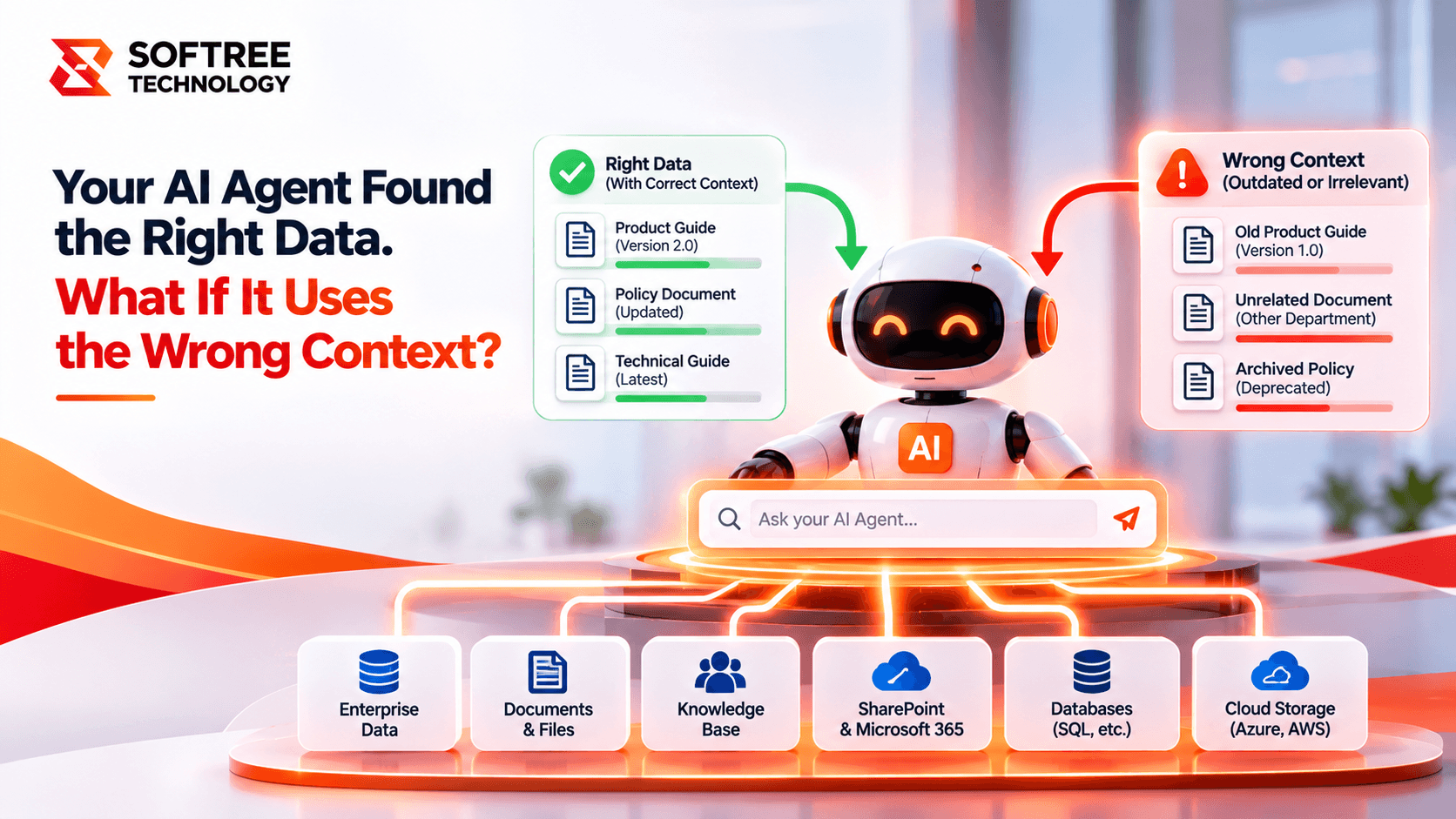
For example, an agent might retrieve an older troubleshooting document that correctly describes an application issue. If the user's application has since been upgraded, that document may no longer apply.
The data was technically relevant, but the context was wrong.
For enterprise agents, context therefore needs to account for the user's request, current conversation, business rules, available tools, permissions, and the most relevant enterprise information.
What Context Does a Microsoft Foundry Agent Need?
A production agent may need several context layers working together.
Instructions define how the agent should behave, what priorities it should follow, and which boundaries it must respect.
Conversation history provides continuity across multiple turns so the agent understands what has already been discussed.
RAG and enterprise knowledge provide grounding information from business documents and other sources. Microsoft Foundry supports retrieval capabilities that can provide relevant information to an agent.
Memory can provide persistent context when an application needs continuity across sessions. Microsoft Foundry Agent Service currently provides managed long-term memory capabilities as a preview feature.
Tools and APIs give agents access to business actions and live information.
Identity and access controls determine what information and actions are available to a particular user or agent.
Evaluation and observability help teams identify where context-related failures occur.
How Does Context Engineering Work?
A production agent starts with the user's request and assembles the context required to complete the task.
Consider an enterprise IT support agent investigating an application outage. Instead of relying only on a retrieved troubleshooting document, the agent may need to consider:
- The current application version
- Recent conversation history
- Approved troubleshooting documentation
- Customer or application information
- Source metadata
- Tool results
- User permissions
The agent can then evaluate these sources together before generating its recommendation.
This approach is especially important when information can conflict. A newer application version may make an older troubleshooting article inappropriate even though the article is highly relevant to the original issue.
RAG Is Not the Same as Context Engineering
RAG is an important part of an agent's context, but it is only one part.
RAG helps an agent retrieve relevant information from enterprise data. Context engineering determines how that information is combined with instructions, conversation history, memory, user information, tools, permissions, and business rules.
Microsoft Foundry's file search capabilities can retrieve relevant information from uploaded enterprise documents and use that information to ground agent responses.
The important distinction is simple:
RAG answers: “What information should I retrieve?”
Context engineering asks: “What information should the agent consider, prioritize, and use for this task?”
When Should You Use Microsoft Foundry Agents?
Microsoft Foundry agents are particularly useful when an application needs enterprise knowledge, multiple tools or APIs, stateful conversations, user-specific context, security controls, or RAG combined with instructions and tools.
A simpler model-based application may be more appropriate when the application only needs a single response, has little enterprise context, follows a deterministic workflow, and does not require tools, memory, or retrieval.
The key question is not whether an agent can be used. It is whether context materially affects the decision the system needs to make.
How to Build Production-Ready Agent Context
Context should be treated as an architecture concern rather than only a prompt-writing exercise.
Start by defining exactly what information the agent needs for each task. Separate stable instructions from dynamic information. Keep retrieved context focused instead of passing large amounts of irrelevant content.
Memory should have a clear purpose and scope. Tool descriptions should explain what each tool does and when it should be used. Identity and least-privilege controls should be applied before sensitive information becomes part of the agent's working context.
Teams should also test conflicting, outdated, and incomplete information rather than evaluating only successful responses.
Microsoft Foundry Agent Service provides managed runtime capabilities for agents, conversations, tools, identity, security, and observability, which can support production agent architectures.
Real-World Technical Example
Imagine an enterprise IT support agent receives the request:
“The application is showing an authentication error. How should I fix it?”
The agent retrieves an approved troubleshooting document recommending a specific configuration change. However, the document applies to version 4 of the application while the employee is running version 5.
A context-aware agent should consider the application version, conversation history, document metadata, user permissions, and available diagnostic tools before recommending the change.
The goal is not simply to retrieve a relevant document. The goal is to determine whether that document is relevant to this user, this application version, and this specific situation.
Production Checklist
Before deploying a Microsoft Foundry agent, verify:
- The required context is clearly defined.
- Stable instructions are separated from dynamic information.
- Conversation history is controlled.
- Retrieved information is relevant and focused.
- Memory has a defined purpose and scope.
- Tool capabilities are clearly described.
- Least-privilege access is applied.
- Conflicting and outdated information is tested.
- Context quality is evaluated separately from final answers.
- Retrieval and tool behavior are monitored.
- Important instructions and knowledge sources are versioned.
Key Takeaway
Finding the right data does not guarantee the right decision.
For Microsoft Foundry agents, context determines how retrieved information is interpreted and used. Instructions, conversation history, memory, RAG, tools, identity, and business rules all contribute to the agent's decision-making context.
Build AI Agents With the Right Context
Softree Technology helps businesses design and build production-ready AI solutions across Microsoft Azure, AWS, and enterprise systems, covering agent architecture, RAG, integrations, data, identity, security, governance, and deployment. Softree_Microsoft_Foundry_Agent…
Ready to build AI agents that use the right context—not just more data?
https://www.softreetechnology.com/