Introduction
Azure Data Analytics provides enterprises with a flexible foundation for bringing data from business applications, operational systems, cloud services, files, and other sources into a governed environment for analytics and decision-making. A modern enterprise data platform should do more than collect data. It should make trusted information available to the right people at the right time while supporting changing workloads, growing data volumes, and evolving business requirements.
Microsoft Azure provides a broad range of services that can support data ingestion, storage, transformation, analytics, governance, reporting, and business intelligence. Depending on business requirements, organizations can use Azure Data Factory, Azure Data Lake Storage, Azure Synapse Analytics, Microsoft Fabric, Azure Databricks, Azure SQL, Power BI, and Microsoft Purview as part of a broader data strategy.
Quick Answer
Azure Data Analytics is the use of Microsoft Azure data services and related analytics capabilities to collect, integrate, store, process, analyze, govern, and visualize enterprise data. It can support traditional business intelligence, self-service analytics, real-time scenarios, advanced analytics, and data products.
The right approach is to start with business outcomes, data sources, governance requirements, security, analytical workloads, and operating models before selecting the Azure technologies needed to support them.
Table of Contents
- What Is Azure Data Analytics?
- Why Enterprises Need a Modern Data Platform
- How Azure Data Analytics Works
- Azure Data Analytics Services
- Benefits of Azure Data Analytics
- Enterprise Use Cases
- Azure Data Analytics vs. Traditional Data Warehouses
- Best Practices
- Implementation Approach
- Measuring ROI
- Key Takeaways
- Conclusion
What Is Azure Data Analytics?
Azure Data Analytics brings together Azure data services and analytics capabilities to create a connected environment for enterprise data. It covers the complete data lifecycle, including data ingestion, storage, transformation, analytics, visualization, governance, security, and monitoring.
A modern Azure data platform can collect information from ERP and CRM systems, SaaS applications, databases, APIs, files, and operational systems. That information can then be stored, transformed, analyzed, and presented through dashboards, reports, KPIs, and other decision-support experiences.
Why Enterprises Need a Modern Data Platform
Many organizations have accumulated data across ERP platforms, CRM systems, operational databases, spreadsheets, cloud applications, departmental tools, and external sources. When these systems are not connected through a coherent data strategy, analytics can become slow, inconsistent, and difficult to scale.
Common challenges include data silos, manual spreadsheet consolidation, inconsistent business metrics, unreliable data integration, limited visibility into data quality and lineage, difficulty scaling analytics, security and compliance challenges, and delays between operational events and management decisions.
How Azure Data Analytics Works
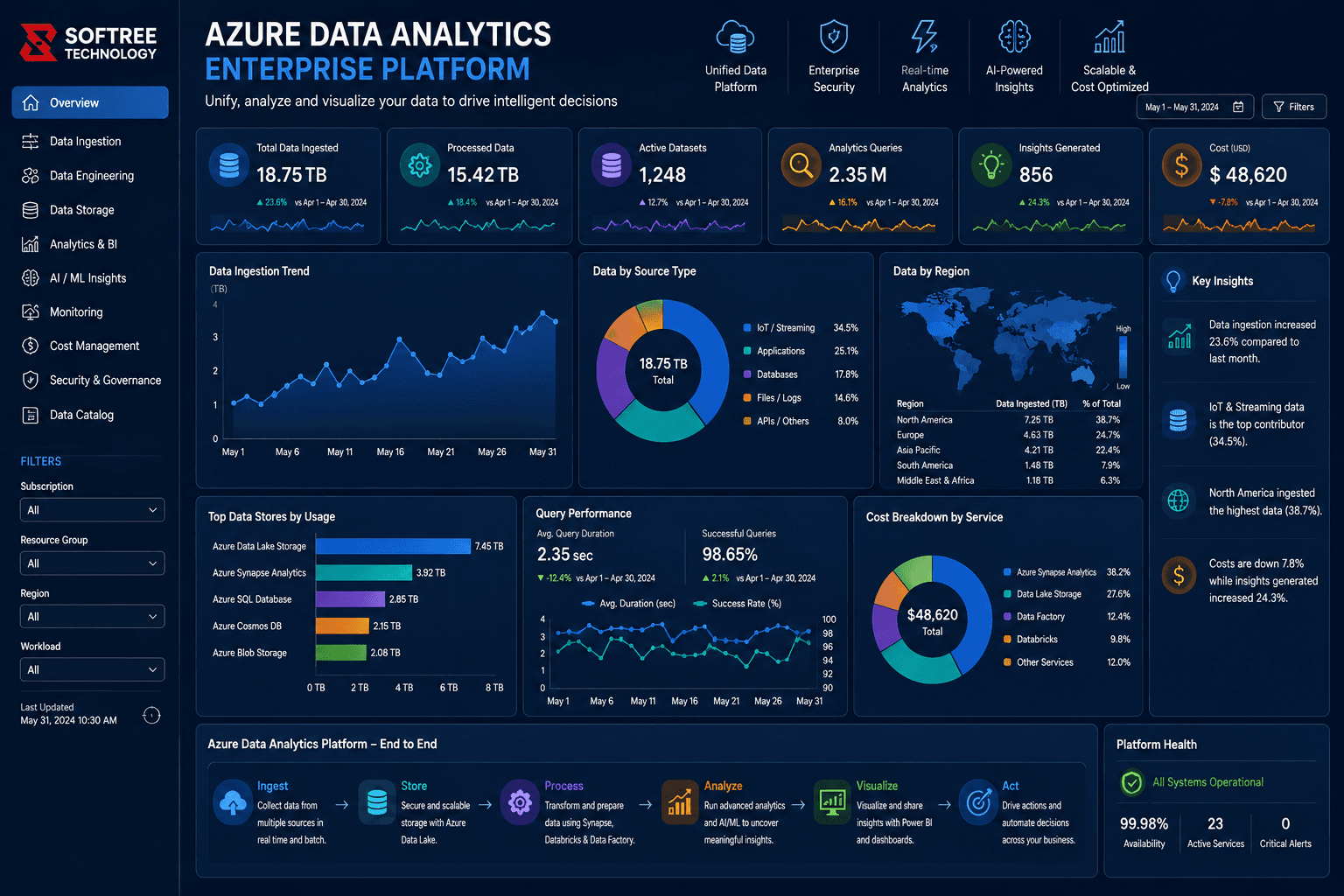
A modern Azure data platform establishes a governed flow from source systems to business insight. Organizations can implement the architecture incrementally, modernizing priority workloads while preserving existing investments where appropriate.
Data Sources: Enterprise applications, ERP, CRM, SaaS platforms, databases, APIs, and files provide the source information.
Ingestion: Azure Data Factory and integration services can move data reliably into the platform through automated and repeatable pipelines.
Storage: Azure Data Lake Storage and Azure SQL can provide scalable storage for raw, curated, and analytical data.
Processing: Azure Databricks, Azure Synapse, and Microsoft Fabric can transform and prepare data for analytics.
Analytics: Synapse, Databricks, and Fabric can support SQL analytics, advanced analytics, data science, and other analytical workloads.
Visualization: Power BI can deliver dashboards, reports, KPIs, and interactive analytical experiences.
Governance & Security: Microsoft Purview, Entra ID, and security controls can support data discovery, lineage, identity, access, and governance.
Azure Data Analytics Services
Azure Data Factory is primarily suited to data integration and orchestration, including batch pipelines, scheduled ingestion, and hybrid integration. Azure Data Lake Storage provides scalable storage for raw, curated, and large-volume analytical data.
Azure Synapse Analytics supports enterprise analytics, SQL analytics, data warehousing, and integrated analytical workloads. Azure Databricks is useful for large-scale transformation, data engineering, data science, and machine learning.
Microsoft Fabric provides an integrated analytics experience across ingestion, engineering, warehousing, and business intelligence. Power BI focuses on dashboards, reporting, KPI tracking, and self-service analytics, while Microsoft Purview supports cataloging, lineage, governance, and data-estate visibility.
Benefits of Azure Data Analytics
A modern Azure data platform can help organizations make decisions faster by automating data pipelines and providing trusted analytical dashboards. Centralized transformation and governance can improve data quality and standardize business definitions.
Organizations can also reduce manual reporting effort through reusable datasets and automated refresh processes. Cloud-based services can scale with data volume, users, and workloads, while frequent or near-real-time data refreshes can improve operational visibility. Governance capabilities can further improve confidence through centralized policies, lineage, access controls, and data cataloging.
Enterprise Use Cases
Azure Data Analytics can support logistics and supply chain organizations by combining shipment, warehouse, carrier, route, and customer data to monitor delivery performance and identify delays.
Financial teams can integrate ERP, finance, and transaction data for profitability analysis, forecasting, budgeting, and management reporting. Sales and customer analytics can unify CRM, marketing, commerce, and customer-service data to analyze customer behavior, pipeline performance, and retention.
Manufacturing organizations can connect production, quality, inventory, and machine data to monitor operations. Healthcare organizations can bring together operational, financial, and service data for performance measurement, reporting, and resource planning while applying appropriate security controls.
Azure Data Analytics vs. Traditional Data Warehouse Approaches
Traditional environments often rely on point-to-point integrations, fixed-capacity warehouses, structured data, scheduled reporting, and fragmented governance. Modern Azure approaches can use cloud-based orchestration, scalable storage, broader data types, BI and advanced analytics, and centralized governance capabilities.
This modern approach also supports incremental, workload-based modernization rather than requiring every organization to complete one large migration project at once.
Best Practices
Start with business outcomes and priority decisions rather than selecting Azure services in isolation. Define data ownership, business glossary terms, data domains, and KPI definitions early so teams have a consistent understanding of enterprise information.
Use a layered architecture so raw, standardized, and consumption-ready data have clear responsibilities. Build reusable ingestion and transformation patterns instead of one-off pipelines, establish data-quality rules, and use metadata, lineage, and cataloging to improve discovery and trust.
Security and identity controls should be established from the beginning, including least-privilege access and appropriate separation of sensitive workloads. Organizations should also monitor pipeline failures, data freshness, query performance, and cloud consumption while continuously optimizing workloads and costs.
Measuring ROI
Organizations can measure the value of Azure Data Analytics by tracking report preparation time, data refresh latency, data-quality issues, analytics adoption, pipeline reliability, and cloud analytics costs.
For example, teams can compare the hours spent on manual data consolidation before and after modernization, measure the time between source-data availability and analytical availability, track recurring data defects, monitor active report users, and measure successful pipeline runs and recovery times.
Implementation Approach
Start by assessing existing data sources, reports, integrations, workloads, users, governance requirements, pain points, and costs. Then define a target architecture that maps business requirements to ingestion, storage, processing, analytics, governance, and visualization capabilities.
Prioritize high-value use cases based on business impact, data readiness, complexity, and implementation effort. Establish the data foundation, build reusable pipelines, develop curated datasets and Power BI experiences, implement governance and security, and continuously optimize performance, reliability, adoption, and cost.
Key Takeaways
✓ Azure Data Analytics provides a foundation for integrating, processing, governing, and analyzing enterprise data.
✓ Azure services can support the complete data journey from ingestion and storage to analytics and Power BI visualization.
✓ A modern data platform can improve decision-making, data quality, scalability, governance, and operational visibility.
✓ Successful implementation should begin with business outcomes and use cases rather than technology selection alone.
Conclusion
Azure Data Analytics provides enterprises with a flexible approach to modernizing fragmented data environments and creating a scalable foundation for analytics and business intelligence. By connecting data sources, automated pipelines, scalable storage, processing services, governance, and visualization, organizations can create a more trusted and accessible data environment.
The most effective strategy is not to treat Azure as a collection of individual services. Instead, organizations should design the platform around business outcomes, data requirements, security, governance, analytical workloads, and long-term scalability.
If your organization is looking to modernize its enterprise data platform, improve analytics, or build an Azure-based data strategy, Softree Technology can help assess your current environment, design the target architecture, modernize data pipelines, build governed analytical datasets, and deliver business-focused analytics solutions.
https://www.softreetechnology.com/