Microsoft Fabric Migration: A Complete Guide to Planning and Execution
Microsoft Fabric brings data engineering, data integration, data warehousing, real-time analytics, and business intelligence into a unified analytics platform. For organizations moving from traditional data platforms or existing Azure services, migration can simplify architecture—but only when it is planned carefully.
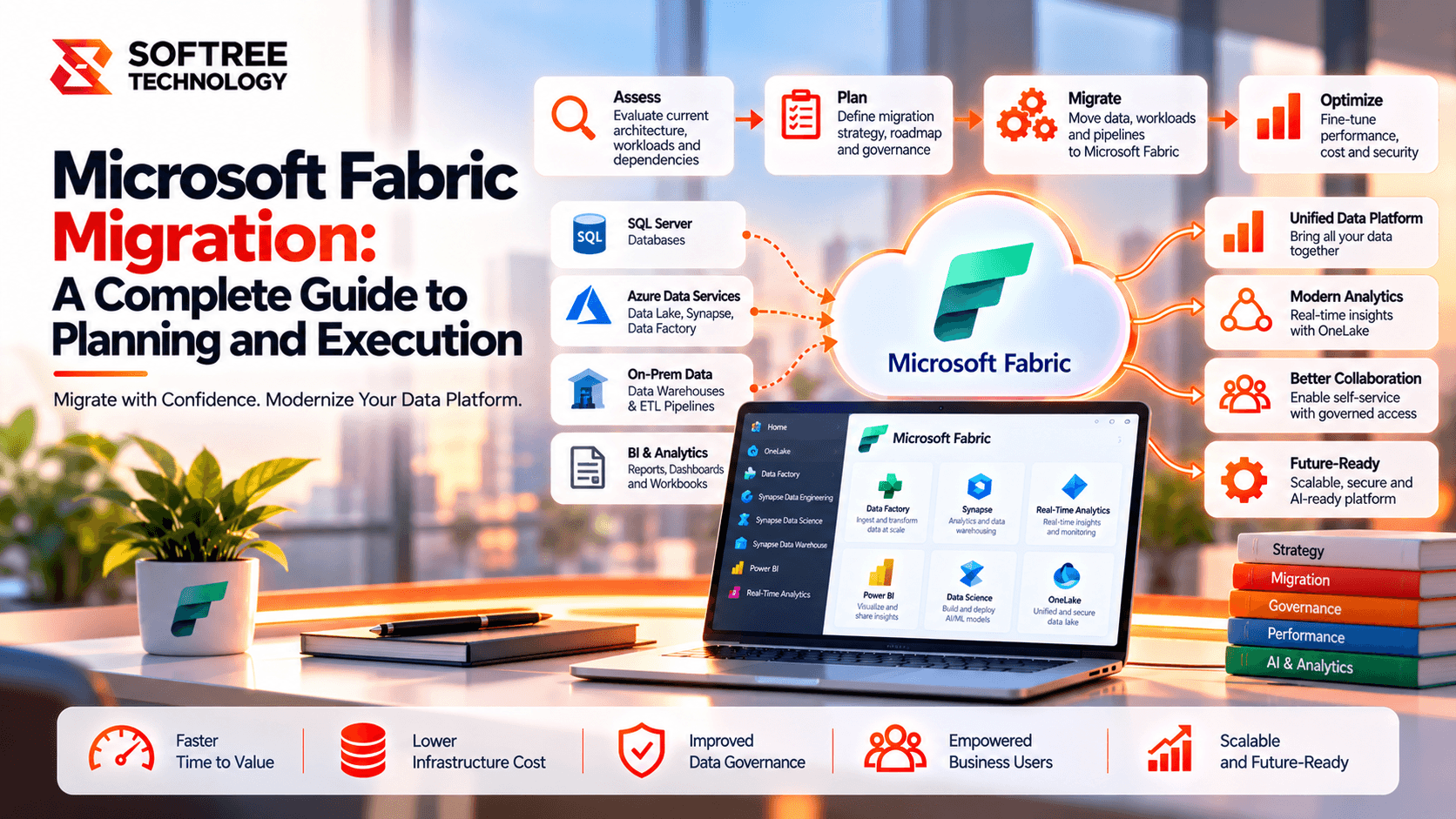
A successful Microsoft Fabric migration starts with understanding the existing data estate, choosing the right target architecture, assessing workloads, planning security and capacity, and validating business-critical data before cutover. The goal is not simply to move data into Fabric; it is to build a secure, scalable, and cost-effective analytics platform.
Quick Answer: How Do You Plan a Microsoft Fabric Migration?
The recommended approach to planning a Microsoft Fabric migration is:
- Assess: Inventory databases, pipelines, reports, notebooks, dependencies, data volumes, and current costs.
- Design: Select the right Fabric workloads, including OneLake, Lakehouse, Warehouse, Data Factory, notebooks, and Power BI.
- Prepare: Configure capacity, workspaces, identity, security, governance, networking, and development environments.
- Pilot: Migrate a representative workload and test functionality, data quality, performance, and cost.
- Migrate: Move data and workloads in controlled phases, prioritizing business value and technical readiness.
- Validate and optimize: Reconcile data, test permissions, monitor capacity, resolve defects, and cut over only after business approval.
Microsoft provides migration guidance for different source platforms, including Azure Synapse Analytics, Azure Data Factory, SQL Server, Azure SQL Database, and other data services. The exact process depends on the source technology and workload.
How Microsoft Fabric Migration Works
A structured migration follows a sequence of controlled stages:
- Discover and assess: Review data sources, pipelines, reports, dependencies, and costs.
- Design the target platform: Select appropriate Fabric workloads, storage, capacity, and security configurations.
- Prepare Microsoft Fabric: Configure workspaces, OneLake, identity, and governance.
- Pilot and migrate: Move representative workloads, including ingestion, transformation, and analytics.
- Validate and optimize: Check data quality, performance, cost, and access controls.
- Production cutover: Transition approved workloads to Fabric.
- Monitor and improve: Track operational health, support users, and optimize the platform.
Treat migration as a sequence of controlled releases rather than a single large data-transfer event.
Step-by-Step Microsoft Fabric Migration Process
Step 1: Assess the Existing Environment
Create an inventory of databases, data warehouses, ETL pipelines, scheduled jobs, notebooks, semantic models, reports, and downstream applications.
Identify data volumes, refresh frequency, service-level requirements, dependencies, security rules, and current infrastructure costs.
Classify workloads into four categories:
- Migrate: Move workloads with minimal changes where appropriate.
- Modernize: Improve architecture, transformations, or processing.
- Consolidate: Combine overlapping systems or redundant workloads.
- Retire: Remove obsolete components that are no longer needed.
Deliverable: A workload inventory, dependency map, risk register, and prioritized migration backlog.
Step 2: Choose the Right Microsoft Fabric Architecture
Microsoft Fabric offers multiple workloads, and not every workload should be moved to the same destination.
- OneLake: Provides a unified logical data lake foundation for Fabric data.
- Lakehouse: Suits data engineering, Spark processing, and lake-oriented analytics.
- Warehouse: Suits structured relational analytics and SQL-based data warehousing.
- Data Factory: Supports data ingestion, orchestration, and transformation workflows.
- Notebooks: Support code-based engineering and data processing.
- Power BI: Delivers semantic models, reports, and business insights.
- Real-Time Intelligence: Supports event streams and time-sensitive analytics scenarios.
Choose the target based on workload requirements, skills, data formats, performance expectations, and existing dependencies.
Fabric is not a one-to-one replacement for every legacy component. Some workloads require redesign or separate migration steps.
Deliverable: A target architecture with documented workload-to-Fabric mappings.
Step 3: Plan Capacity, Cost, and Environments
Estimate compute requirements based on ingestion, transformation, SQL queries, Spark jobs, report usage, and concurrent workloads.
Plan the capacity model and monitor consumption using Fabric capacity-management tools. Account for peak loads, refresh windows, development activity, and future growth. Do not size capacity based only on the volume of stored data.
Establish separate development, test, and production environments where appropriate. Define deployment, testing, release, and rollback procedures before moving critical workloads.
Deliverable: A capacity estimate, cost model, and environment strategy.
Step 4: Prepare Security and Governance
Configure Microsoft Entra ID identities, workspace access, tenant settings, data permissions, and service identities where required.
Define who can create Fabric items, administer workspaces, access sensitive data, and deploy changes.
Review the following areas:
- Row-level and column-level security requirements.
- Sensitivity labels and data protection.
- Data lineage and auditing.
- Compliance obligations.
- Workspace permissions and administrative responsibilities.
Use Microsoft Purview capabilities where they fit your governance requirements and licensing. Fabric also provides governance and administrative features through experiences such as the OneLake catalog, alongside other platform controls.
Deliverable: An approved security model, access matrix, and governance plan.
Step 5: Run a Pilot Migration
Select a representative workload with meaningful business value but manageable complexity.
Include its source data, ingestion process, transformations, semantic model, reports, and security rules. Test the full pipeline from source to consumption.
Validate:
- Data reconciliation and accuracy.
- Pipeline execution times.
- Refresh behavior.
- Access controls.
- Capacity consumption.
- Report functionality.
Record issues and refine the migration approach before scaling.
Deliverable: A pilot report with measured results, lessons learned, and an approved migration pattern.
Step 6: Migrate Workloads in Waves
Group workloads by business domain, dependencies, complexity, and criticality.
Move related data pipelines, storage objects, transformations, semantic models, and reports in a planned order.
Depending on the workload, migration may involve supported migration tools, code changes, data replication, pipeline reconstruction, or manual recreation. Review feature compatibility and limitations before selecting the method.
Avoid switching production consumers to partially migrated data. Keep the source environment available until the new workflow meets acceptance criteria.
Deliverable: A migration tracker showing completed, validated, blocked, and deferred workloads.
Step 7: Validate Data and Business Functionality
Before production cutover, confirm that migrated workloads produce the expected results.
- Reconcile row counts, totals, and key business measures.
- Compare transformation results with the source system.
- Test pipeline schedules, dependencies, and failure handling.
- Validate semantic models, reports, and downstream integrations.
- Confirm security rules with representative users.
- Measure query performance, refresh duration, and capacity consumption.
Deliverable: A documented test report and business acceptance.
Step 8: Cut Over and Optimize
Define the cutover window, freeze or control source changes where necessary, run final loads, and redirect downstream consumers to Fabric.
After cutover, monitor pipeline failures, query performance, refresh schedules, capacity usage, costs, and user feedback.
Retain the source environment until the agreed stabilization and rollback period has passed. Decommission legacy components only after dependencies and retention requirements have been addressed.
Deliverable: An accepted production platform, support plan, and legacy retirement decision.
Real-World Example: Migrating an Analytics Environment to Fabric
Consider a company with SQL Server databases, Azure Data Factory pipelines, a legacy warehouse, and Power BI reports used by 600 employees.
The team inventories 120 pipelines, 80 reporting datasets, and the dependencies behind its finance and sales dashboards.
It maps relational analytics workloads to Fabric Warehouse and data-engineering workloads to Lakehouse, while retaining appropriate source systems during the transition.
A pilot moves one sales reporting workflow into Fabric. The team compares financial totals, validates pipeline schedules, tests report permissions, and measures capacity consumption. It resolves a transformation discrepancy and adjusts a heavy refresh schedule before migrating other departments in waves.
The company then redirects report consumers to the validated Fabric environment and monitors performance and cost during stabilization.
The lesson: Migrate complete business workflows, not isolated data objects, and use a pilot to prove the architecture before scaling.
When Should You Use This Migration Approach?
A structured migration is especially useful when your organization has:
- Multiple source platforms.
- Complex pipelines and data dependencies.
- Large data volumes.
- Sensitive information and strict access requirements.
- Business-critical reporting.
- Low-downtime expectations.
A small and straightforward workload may be migrated with a simpler process. Large data estates, complex legacy transformations, strict compliance requirements, or low-downtime expectations typically need deeper assessment, automation, and specialist planning.
Microsoft Fabric Migration Production Checklist
Use this checklist to assess readiness before production cutover.
Inventory source systems, workloads, dependencies, and data volumes.
Classify workloads as migrate, modernize, consolidate, or retire.
Define the target Fabric architecture and workload mappings.
Estimate capacity, consumption, and operating costs.
Configure workspaces, environments, identity, and access controls.
Establish governance, lineage, auditing, and data-protection policies.
Select migration methods and document compatibility limitations.
Complete a representative pilot and record lessons learned.
Migrate in controlled waves with named owners.
Reconcile data and validate pipelines, reports, and security.
Obtain business sign-off and approve cutover criteria.
Monitor performance, capacity, cost, and failures after launch.
Retire legacy components only after dependencies and rollback needs are resolved.
Key Takeaways
- Microsoft Fabric migration begins with workload discovery and architecture decisions.
- Choose Lakehouse, Warehouse, and other Fabric workloads based on actual requirements.
- Security, governance, capacity, and cost must be planned before production migration.
- A representative pilot reduces risk and helps establish reusable migration patterns.
- Validate complete data workflows and business outcomes before cutover.
- Continue monitoring and optimization after the migration is complete.
A successful migration is not simply about moving data into Microsoft Fabric. It is about establishing a secure, scalable, and cost-effective analytics platform that supports business requirements and remains reliable in production.
How Softree Can Help
Softree helps organizations assess existing data platforms, design Microsoft Fabric target architectures, plan migration waves, validate data pipelines, and prepare secure analytics workloads for production.
Planning a Microsoft Fabric migration?
Start with a structured assessment of your data estate, business priorities, technical dependencies, and capacity requirements to build a practical migration roadmap.
https://www.softreetechnology.com/services/microsoft-fabric-development-services