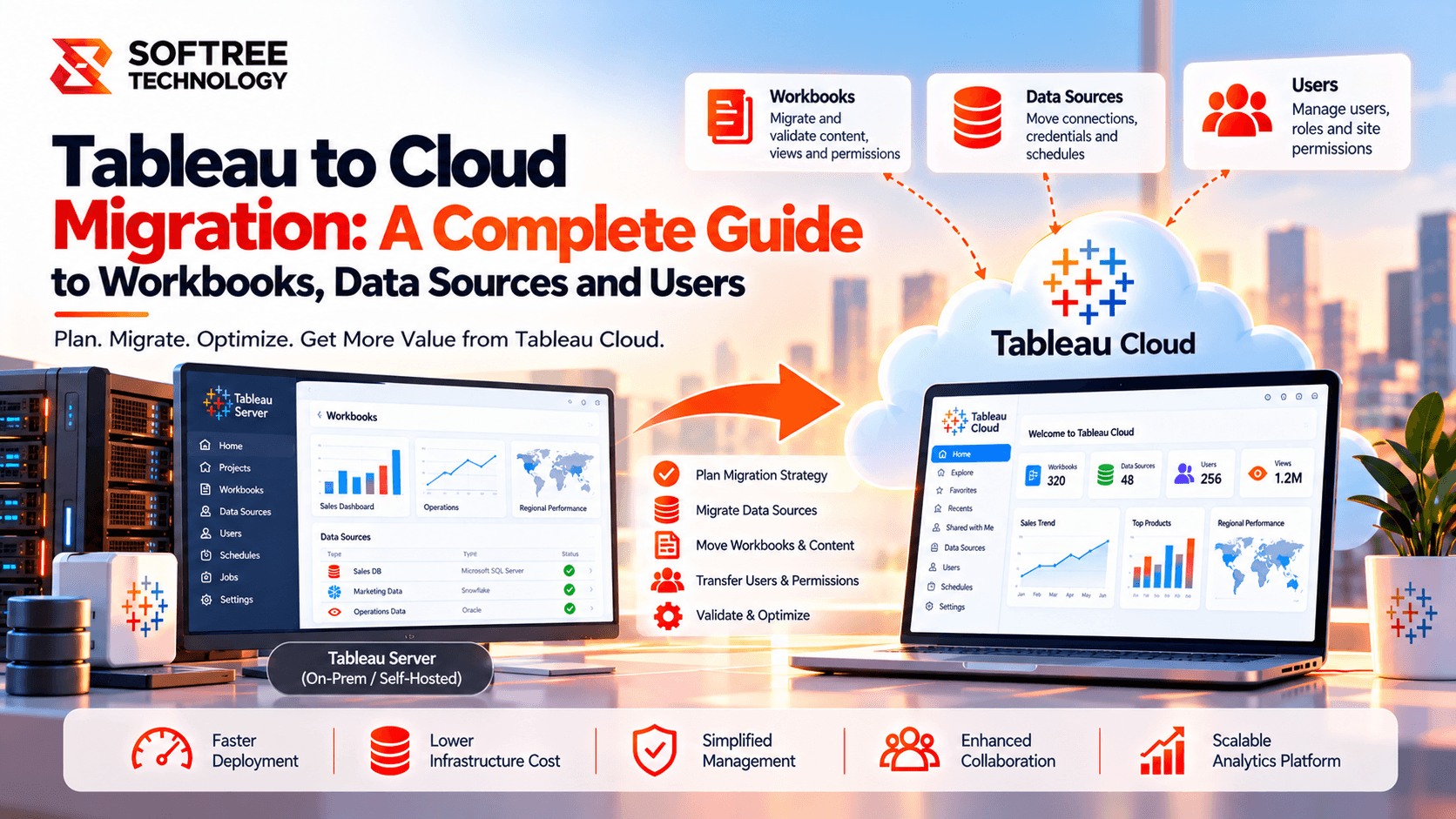
Tableau to Cloud Migration: A Complete Guide to Workbooks, Data Sources and Users
Migrating Tableau Server to Tableau Cloud involves more than moving dashboards. Workbooks depend on data sources, users rely on permissions, and business reporting depends on refresh schedules and secure access. If these elements are migrated separately without planning, dashboards may fail, users may lose access, or sensitive data may become exposed.
The key is to migrate workbooks, data sources, and users as connected parts of one migration plan. This guide explains what needs to move, how the components depend on each other, and how to validate them in production.
Quick Answer: What Needs to Be Migrated?
During a Tableau Server to Tableau Cloud migration, focus on three connected workstreams:
- Workbooks: Migrate dashboards, worksheets, calculations, filters, and related content. Validate data connections, embedded credentials, extensions, and integrations.
- Data sources: Migrate published data sources and configure supported connections, credentials, extracts, and refresh schedules. Use Tableau Bridge when required for private-network data.
- Users and groups: Provision users, map identities and group membership, assign appropriate site roles, and recreate or validate permissions.
- Dependencies: Migrate components in a planned order so workbooks can access the correct data and users can securely access the content they need.
A successful migration preserves the relationships between content, data, and identity—not just the individual objects.
How Tableau Cloud Migration Works
A coordinated migration follows a structured workflow:
- Assess Tableau Server: Inventory workbooks, published data sources, users, groups, and permissions.
- Map dependencies: Identify which workbooks depend on specific data sources and which users need access.
- Prepare Tableau Cloud: Configure identity, connectivity, credentials, and the destination environment.
- Migrate data sources: Configure connections, extracts, refresh schedules, and Tableau Bridge where required.
- Migrate workbooks: Move dashboards and supporting content, then resolve broken references and integration issues.
- Configure users and permissions: Provision users, map groups, assign site roles, and validate access.
- Run integrated testing: Verify dashboard values, data refreshes, permissions, and row-level security.
- Complete production cutover: Obtain business-owner approval and monitor the environment after launch.
Workbook migration, data source migration, and user migration are related workstreams. They should be planned together and validated as one end-to-end workflow.
Workbook Migration Explained
A Tableau workbook contains worksheets, dashboards, calculations, filters, parameters, formatting, and references to data sources. Moving a workbook file or publishing it to Cloud does not automatically guarantee that every dependency will work as expected.
What Needs to Be Migrated?
- Workbooks and dashboards.
- Worksheets, calculations, parameters, and filters.
- References to published or embedded data sources.
- Required extensions and embedded analytics configurations.
- Relevant workbook permissions and ownership.
- Connections and settings that may need updating.
Common Workbook Migration Challenges
Broken data references: A workbook may refer to a published data source that has not yet been migrated or to a database endpoint that Cloud cannot reach.
Unsupported or changed behavior: Extensions, integrations, custom workflows, and some environment-specific features may require separate review or reconfiguration.
Security differences: Workbook access does not replace data-level security. Row-level security and user-specific filtering must be tested in the destination environment.
Recommended Approach
- Inventory workbooks and identify their dependencies.
- Prioritize content based on business criticality and usage.
- Migrate required data sources and establish connectivity.
- Migrate workbooks using an appropriate supported method.
- Reconfigure connections, credentials, and integrations where needed.
- Compare key dashboards with Tableau Server results and obtain business-owner approval.
Data Source Migration Explained
Data sources are critical because dashboards are useful only when their underlying data is accessible, current, and accurate.
Tableau environments may contain embedded data sources, published data sources, live connections, extracts, and connections to cloud or on-premises databases. Each type requires a clear migration and validation plan.
What Needs to Be Migrated or Configured?
- Published data sources and their metadata.
- Embedded data source dependencies within workbooks.
- Database connection details and authentication.
- Extracts and refresh schedules.
- Custom SQL and relevant connection logic.
- Data source permissions and certification or governance metadata, where applicable.
- Connectivity through Tableau Cloud or Tableau Bridge, as required.
Live Connections Versus Extracts
Live connections: These query the underlying data source. Confirm that Tableau Cloud can reach the database, authenticate successfully, and execute the required queries.
Extracts: These use stored snapshots of data. Confirm that extracts are available or regenerated as required and that scheduled refreshes complete successfully after migration.
For data behind a private network, Tableau Bridge may be required. Review Bridge architecture, supported connection types, credentials, refresh requirements, and capacity before production cutover.
Recommended Approach
- Inventory every data source and identify its dependent workbooks.
- Classify connections as live or extract-based.
- Confirm destination connectivity and authentication requirements.
- Migrate or recreate each data source using a supported approach.
- Configure credentials, Tableau Bridge where required, and refresh schedules.
- Test data accuracy, refresh completion, and access permissions.
- Reconnect and validate dependent workbooks.
Important: Do not assume that moving a published data source automatically transfers every credential, schedule, or operational setting. Verify the destination configuration explicitly.
User and Group Migration Explained
Users and groups determine who can sign in, what content they can discover, and which data they are allowed to see. A successful content migration can still fail operationally if identity and permissions are not configured correctly.
What Needs to Be Migrated or Configured?
- User accounts and identity mapping.
- Authentication and sign-in configuration.
- Group membership.
- Site roles and licensing assignments.
- Project, workbook, and data source permissions.
- Ownership of important content.
- Row-level security and other data-access rules.
User Migration Is More Than Copying Accounts
Tableau Cloud site roles determine the maximum capabilities a user can have. Permissions determine access to specific content and actions. Authentication is a separate concern, and user provisioning may depend on the organization's identity provider and configured provisioning method.
Do not assume that a user's Tableau Server identity, group membership, site role, and permissions will all transfer automatically or behave identically in Cloud.
Recommended Approach
- Export or document existing users, groups, site roles, and permissions.
- Confirm the Cloud authentication and user-provisioning approach.
- Provision or map users to their Cloud identities.
- Assign suitable site roles and licensing.
- Recreate or validate group membership and content permissions.
- Test access using representative accounts, including restricted users.
- Confirm that row-level security continues to enforce the intended data restrictions.
Security rule: Validate both content access and the data a user can see. Being able to open a dashboard does not prove that row-level security is correct.
Real-World Example: Coordinating a Tableau Migration
Consider a company with 350 Tableau users, 450 workbooks, 60 published data sources, Snowflake, an on-premises SQL Server database, and group-based row-level security.
The migration team identifies the data sources used by critical finance and operations dashboards. It configures Cloud access to Snowflake and establishes Tableau Bridge connectivity for the private SQL Server environment.
Next, the team migrates and validates the required data sources, then moves dependent workbooks. In parallel, it provisions Cloud users, maps groups, assigns site roles, and reviews permissions.
During testing, the team discovers that one workbook still points to an old data source and that a restricted user's access behaves differently from the expected policy. Both issues are corrected before cutover.
Business owners then verify dashboard values, refreshes, and user access.
The lesson: Validate workbooks, data sources, and users together before releasing migrated content to production.
When Should You Use This Migration Approach?
Use a coordinated migration approach when your Tableau environment includes:
- Many workbooks sharing published data sources.
- Multiple user groups with different access requirements.
- Row-level security or sensitive reporting.
- Private-network databases and extract refreshes.
- Embedded dashboards or external integrations.
- Business-critical reporting that must remain available during cutover.
For small environments, a manual process may be sufficient. Larger or more complex deployments may benefit from migration automation, a dependency register, and a formal validation plan.
Recommended Production Architecture
A practical production design separates migration into three coordinated tracks.
Track A: Content
- Inventory workbooks.
- Migrate data sources.
- Migrate workbooks.
- Validate content and dependencies.
Track B: Identity and Security
- Configure authentication.
- Provision users.
- Map groups.
- Assign site roles.
- Validate permissions and row-level security.
Track C: Connectivity and Operations
- Configure data connections.
- Set up Tableau Bridge if needed.
- Configure refresh schedules.
- Monitor and test connectivity.
Bring all three tracks together in an integrated acceptance test before production cutover.
Use a shared migration tracker to link each workbook to its data sources, owner, user groups, validation status, and cutover wave. This makes dependencies visible and reduces the risk of migrating content without the required access or connectivity.
Tableau Cloud Migration Checklist
Before production cutover, verify the following:
Inventory workbooks, published data sources, embedded sources, users, and groups.
Record dependencies between workbooks and data sources.
Prioritize content based on usage and business criticality.
Confirm supported migration methods for the content and environment.
Configure destination data connectivity and authentication.
Set up Tableau Bridge where required.
Migrate or recreate data sources and validate refreshes.
Migrate workbooks and resolve connection or integration issues.
Provision users and validate site roles and licensing.
Review group membership, content permissions, and row-level security.
Test dashboards with representative user accounts.
Obtain business-owner sign-off before cutover.
Monitor refreshes, access issues, and user feedback after launch.
Key Takeaways
- Workbooks, data sources, and users are interconnected migration components.
- Data source connectivity and refreshes must be validated, not merely configured.
- User provisioning, site roles, group membership, and permissions require separate checks.
- Row-level security must be tested using representative identities.
- A shared dependency tracker and end-to-end validation reduce migration risk.
The objective is not simply to move Tableau content. It is to preserve the relationships between dashboards, underlying data, user identities, and access policies so business reporting remains reliable after migration.
How Softree Can Help
Softree helps organizations plan and execute Tableau Server to Tableau Cloud migrations, including content assessment, workbook and data source dependencies, identity and permissions, data connectivity, and production validation.
Planning your Tableau migration?
Start by mapping your workbooks, data sources, and user access requirements to build a controlled migration roadmap that protects data integrity, security, and business continuity.
https://www.softreetechnology.com/services/tableau-migration-services