Introduction
Every organization processes documents such as invoices, contracts, purchase orders, employee records, and customer forms daily. Manual processing is slow, error-prone, and costly, often delaying business operations and increasing administrative effort.
Intelligent Document Processing (IDP) uses Artificial Intelligence (AI), Optical Character Recognition (OCR), Machine Learning (ML), and workflow automation to extract, classify, validate, and process documents automatically.
In this guide, you'll learn:
- What Intelligent Document Processing is
- Why it matters for modern businesses
- How Microsoft AI technologies power document automation
- Common use cases and best practices
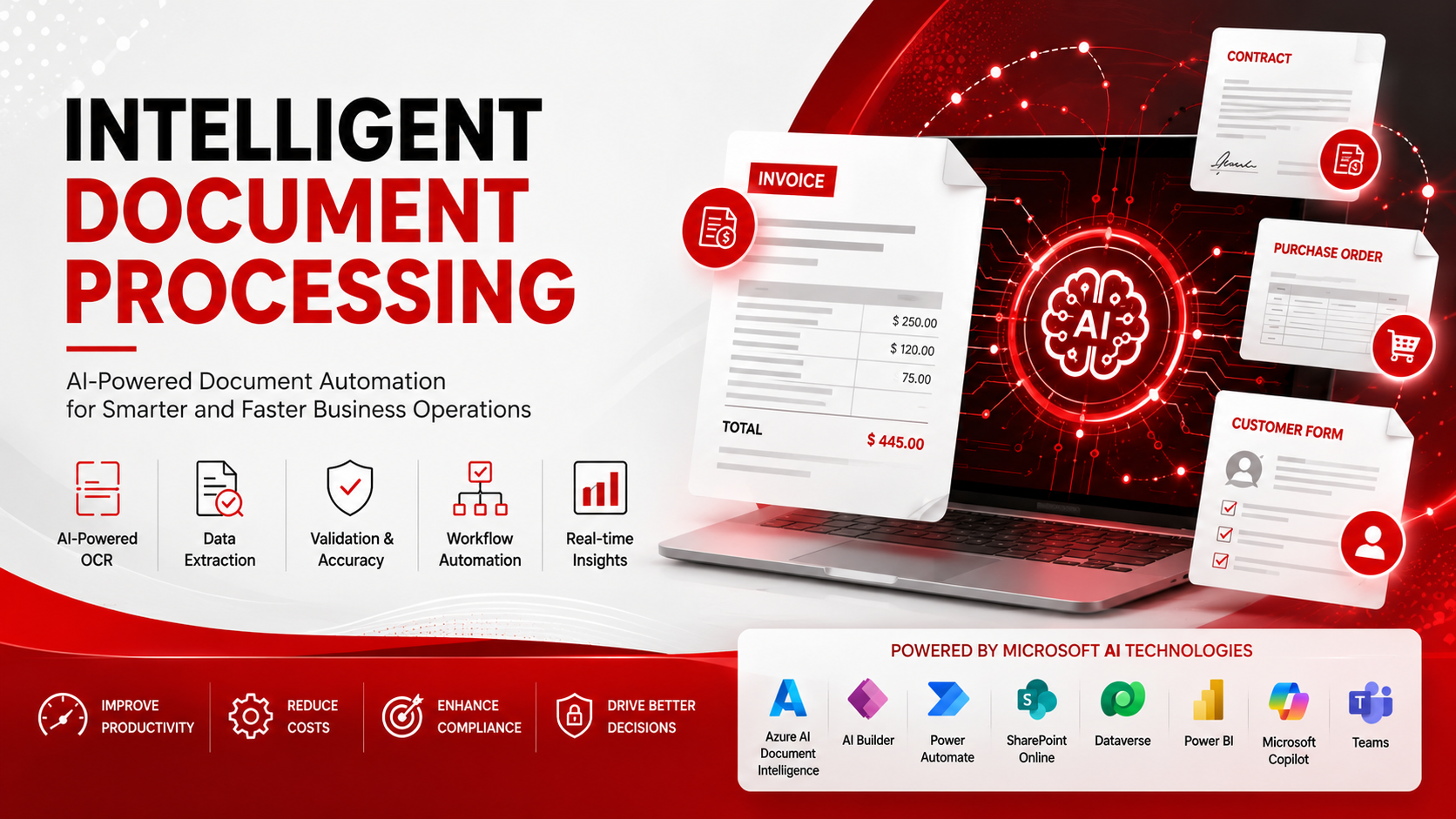
Intelligent Document Processing (IDP) automates the capture, extraction, validation, and processing of information from structured and unstructured documents. Microsoft delivers a complete IDP solution through Azure AI Document Intelligence, AI Builder, Power Automate, SharePoint Online, Dataverse, Microsoft Copilot, Power BI, and Microsoft Teams.
At a glance:
- Automates repetitive document processing
- Improves accuracy and compliance
- Accelerates business workflows
- Reduces operational costs
What is Intelligent Document Processing?
Intelligent Document Processing (IDP) combines AI, Machine Learning, and OCR to read, understand, classify, and process business documents. Unlike traditional OCR, IDP understands document context and automatically validates and routes information through business workflows.
- Invoices
- Purchase Orders
- Contracts
- Employee Documents
- Tax Forms
- Insurance Claims
- Customer Applications
- Compliance Documents
Why is Intelligent Document Processing Important?
Manual document processing creates delays, increases costs, and introduces human error. IDP automates repetitive tasks, helping organizations improve efficiency, compliance, and decision-making.
Business benefits:
- Faster document processing
- Higher employee productivity
- Improved data accuracy
- Better compliance
- Lower operational costs
- Faster customer onboarding
Challenges solved:
- Manual data entry
- Slow approvals
- Paper-based workflows
- Human errors
- Compliance risks
How Does Intelligent Document Processing Work?
IDP transforms business documents into structured data using AI and automation.
The process includes:
- Capture & Classify – Collect documents from email, SharePoint, scanners, mobile devices, or cloud storage.
- Extract & Validate – AI extracts key information and validates it using business rules.
- Automate Workflows – Processed data is stored and routed through Power Automate, SharePoint, Dataverse, ERP/CRM systems, and Microsoft Teams.
Workflow
Business Documents → Azure AI Document Intelligence → Classification → Data Extraction → Validation → Power Automate → SharePoint & Dataverse → Power BI & Copilot
Key Features / Components
Microsoft's IDP solution combines AI, automation, and document management into a unified platform.
Core technologies include:
- Azure AI Document Intelligence – Document extraction and OCR
- AI Builder – Low-code AI document processing
- Power Automate – Workflow automation
- SharePoint & Dataverse – Secure storage and business data
- Microsoft Copilot & Power BI – AI insights and reporting
Benefits of Intelligent Document Processing
Implementing IDP helps organizations automate document-centric processes while improving operational efficiency.
Key benefits:
- Higher accuracy
- Lower operational costs
- Better compliance
- Improved customer experience
- Real-time business insights
Common Use Cases
Organizations use IDP across multiple business functions, including:
- Invoice processing
- Contract management
- Employee onboarding
- Customer onboarding
- Claims processing
- Compliance management
Common Mistakes to Avoid
Avoid these common implementation mistakes:
- Automating poor-quality processes
- Skipping validation
- Using inconsistent document formats
- Ignoring governance and security
- Treating OCR as complete IDP
Key Takeaways
- IDP automates document extraction, validation, and workflows.
- Azure AI Document Intelligence powers intelligent document understanding.
- Power Automate streamlines enterprise workflows.
- SharePoint, Dataverse, Copilot, and Power BI complete the Microsoft document automation ecosystem.
- Organizations benefit from faster processing, lower costs, and improved accuracy.
Conclusion
Intelligent Document Processing helps organizations replace manual document handling with AI-powered automation, improving accuracy, compliance, and operational efficiency. Microsoft's integrated AI ecosystem provides everything needed to build secure and scalable document automation solutions.
Why Softree Technology?
Softree Technology helps organizations design and implement Intelligent Document Processing solutions using Microsoft AI and Power Platform technologies. Our experts deliver:
- AI-powered document extraction
- Workflow automation with Power Automate
- SharePoint and Dataverse integration
- Custom AI model development
- Enterprise deployment and support
Whether you're automating invoices, contracts, onboarding, or compliance workflows, Softree Technology can help you build secure, scalable, and future-ready document automation solutions.