Introduction
A data lake can store large volumes of files, but managing those files as reliable tables becomes difficult when pipelines perform updates, deletes, concurrent writes, or schema changes. Delta Lake addresses this challenge by adding a transaction-aware table layer to data stored in Parquet files. In Microsoft Fabric, Delta tables provide table-level reliability for Lakehouse workloads while supporting capabilities such as ACID transactions, schema controls, table history, and optimization.
Delta Lake is therefore not simply another storage format. It helps engineering teams manage lake data as structured tables that can be consumed across compatible Fabric workloads while still requiring appropriate data modeling, validation, security, and operational controls.
Key Takeaways
Delta Lake is a strong choice for many curated Fabric Lakehouse workloads, particularly when teams need reliable incremental writes, merges, deletes, schema controls, and consistent table versions. However, it should be selected based on workload requirements rather than treated as a universal solution.
- Delta tables combine Parquet files with a transaction log.
- ACID transactions help provide atomic changes and consistent snapshots.
- Schema enforcement and controlled evolution reduce downstream surprises.
- Table history can support recovery and auditing scenarios.
- Compaction and other optimization techniques can help manage file growth.
- Data quality and business validation remain necessary.
- Delta tables should be designed around actual workload and engine requirements.
What We Learned
How Delta Lake Fits into Microsoft Fabric
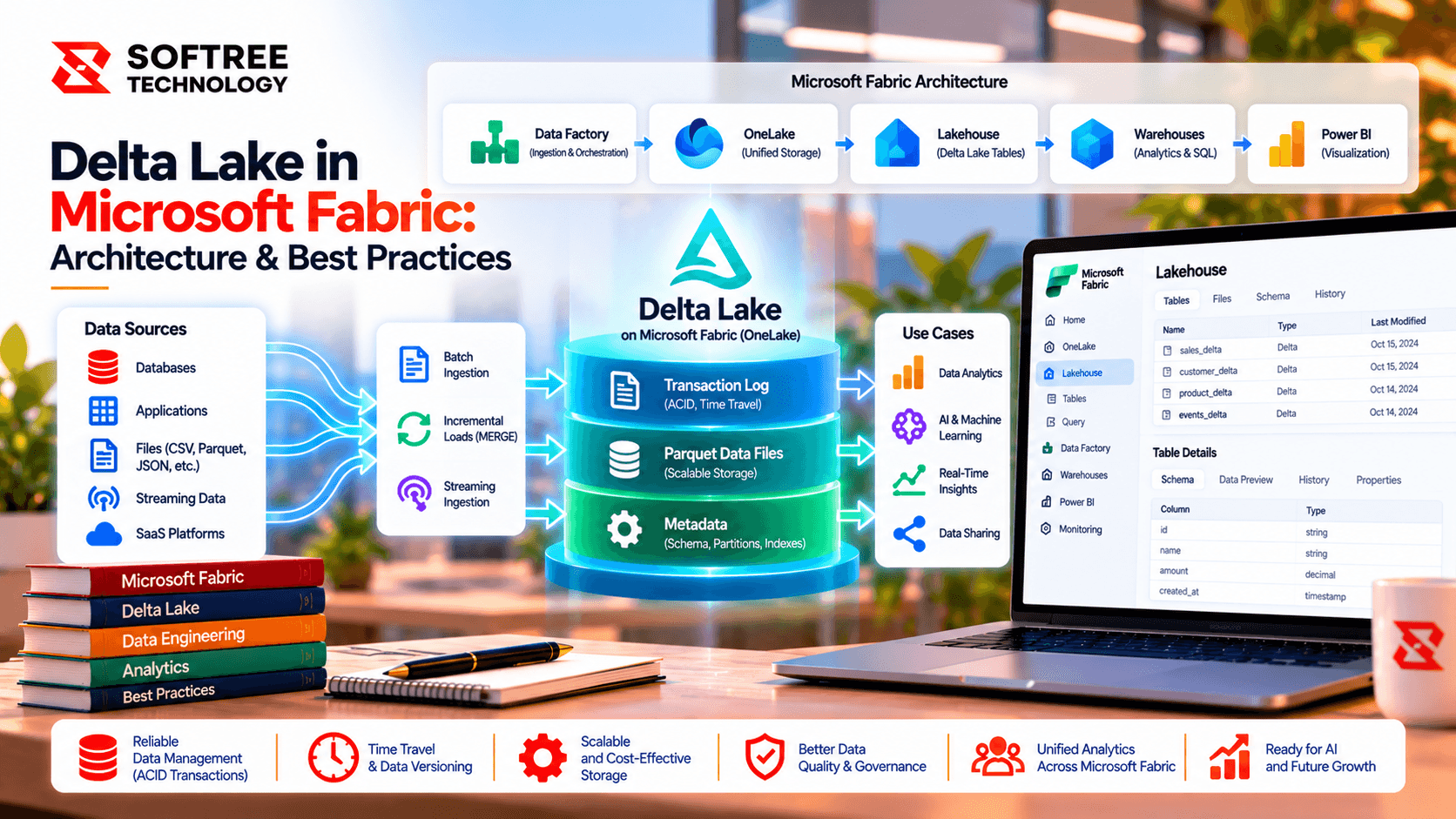
A Fabric Lakehouse combines OneLake storage with table and analytics capabilities. Delta tables form the structured layer used by Spark notebooks and other compatible Fabric experiences.
The architecture can be viewed in three layers:
OneLake Storage → Delta Table → Fabric Workloads → Analytics Consumers
The Delta table consists of Parquet data files and the _delta_log transaction history. Fabric workloads interact with the table state rather than treating the underlying files as an unmanaged collection.
Why the Transaction Log Matters
Parquet provides efficient columnar storage, but it does not by itself provide the table-management semantics needed for frequent data changes.
Delta Lake adds a transaction log that records committed table changes and metadata. This allows supported operations to maintain consistent table versions and manage updates and deletes through table semantics.
This distinction is important: a Delta table is not simply a folder of Parquet files. Reading the underlying folder directly as raw Parquet can bypass Delta table semantics.
ACID Transactions and Data Reliability
For supported operations, ACID transactions help make table changes atomic and allow readers to work with consistent snapshots.
However, transactions do not automatically guarantee that the data is correct from a business perspective. Teams still need data-quality checks, reconciliation, validation rules, and appropriate pipeline controls.
For production workloads, teams should consider:
- Duplicate detection
- Required-field validation
- Business-rule validation
- Source-to-target reconciliation
- Idempotent ingestion
- Failure and retry handling
- Recovery testing
Managing Schema Evolution
Schemas change as applications and business requirements evolve. Adding a column may appear simple, but downstream semantic models, reports, pipelines, and data products may depend on the existing structure.
A controlled approach should include:
- Define a data contract for keys, types, required fields, and valid values.
- Review proposed schema changes.
- Assess downstream dependencies.
- Apply supported schema-evolution mechanisms.
- Run regression tests.
- Keep curated schemas governed.
Optimizing Delta Tables
Delta table optimization should be based on measured workload behavior rather than assumptions.
Before changing the table layout, review:
- File counts
- Query plans
- Scan volume
- Pipeline duration
- Data volume
- Query patterns
Depending on the workload and supported Fabric capabilities, teams can then evaluate approaches such as compaction, ingestion batching, query optimization, or partitioning.
When Should You Use Delta Tables?
Delta tables are particularly useful when pipelines require reliable incremental writes, merges, or deletes; when multiple teams need governed Lakehouse tables; when schema controls and table history are important; or when data is shared across engineering and analytics workflows.
They may be less appropriate when the workload is only immutable file archival, requires low-latency point lookups, depends on unsupported engine features, or is better suited to a specialized warehouse, event store, or operational database.
Production Readiness
A production Delta Lake implementation should include more than table creation. Teams should define ownership, permissions, observability, recovery procedures, and data-quality thresholds.
Useful controls include:
- Batch IDs and input/output counts
- Execution duration and error tracking
- Table-version monitoring where available
- Least-privilege access
- Controlled concurrency
- Recovery and reprocessing tests
- Retention and lifecycle policies
- Representative query benchmarks
Practical Example
Consider a Fabric Lakehouse receiving frequently updated business data. Instead of managing individual Parquet files directly, the ingestion process writes changes to a Delta table and uses the transaction log to maintain the committed table state.
Downstream Fabric workloads can then consume the table through supported access paths while engineering teams apply validation, schema governance, monitoring, and optimization based on the workload.
The example should be treated as an architectural pattern rather than a measured client result; implementation details should be validated against the target Fabric runtime.
Next Steps
Start by identifying which datasets require table-level reliability, incremental updates, merges, deletes, schema controls, or consistent snapshots. Then evaluate the workload, Fabric engine capabilities, data volume, freshness requirements, query patterns, and recovery needs before choosing the table design.
Softree can help review Delta table layouts, ingestion reliability, Lakehouse architecture, data-quality controls, and production-readiness practices for Microsoft Fabric workloads.
https://www.softreetechnology.com/services/microsoft-fabric-development-services


