Quick Answer
AI testing in CI/CD uses artificial intelligence to make automated quality pipelines more adaptive and efficient. Instead of treating every code change and every test failure the same way, AI can analyze historical test data, code changes, failures, and application behavior to determine where testing attention is most valuable.
The goal is not to run fewer tests simply for the sake of speed. The goal is to make testing smarter by identifying risks earlier, prioritizing relevant coverage, reducing repetitive analysis, and helping QA teams make better release decisions.
Why AI Matters in CI/CD Testing
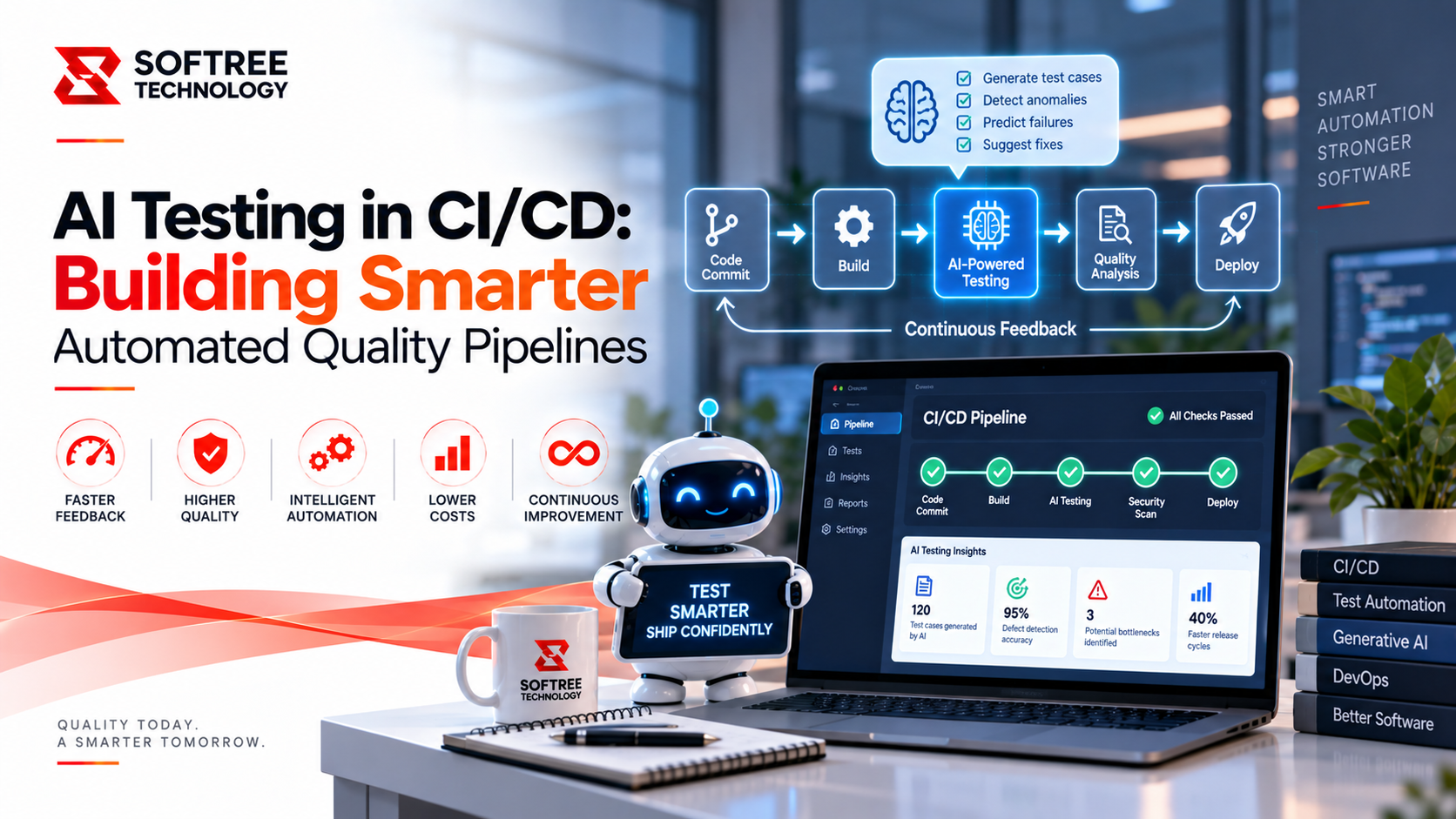
A traditional CI/CD pipeline may execute hundreds or thousands of automated tests whenever new code is committed. A typical flow moves from code commit to build, unit testing, API testing, UI testing, regression testing, and finally deployment.
While this approach provides valuable coverage, large test suites can take considerable time to execute. AI can make the process more intelligent by helping determine which tests are most relevant to a specific code change, which failures are likely genuine defects, which failures may be infrastructure-related, and which tests repeatedly fail for unrelated reasons.
AI can also identify areas that may require additional testing and detect unusual build behavior by comparing current results with previous builds.
AI-Enhanced CI/CD Testing Architecture
An AI-assisted CI/CD pipeline can introduce intelligence across multiple stages of the software delivery process:
Developer Commit → Build & Static Checks → AI Change Analysis → Test Prioritization → Automated Tests → AI Failure Analysis → Quality Assessment → Deployment Decision → Production Monitoring
This approach allows AI to participate in more than just test execution. It can analyze changes before tests run, interpret failures after execution, contribute additional quality signals before deployment, and support continuous monitoring after release.
AI-Based Test Prioritization
Large applications can have thousands of automated tests. Running the entire test suite after every small change can significantly increase pipeline execution time.
AI can analyze historical test results and current code changes to identify tests that are more likely to detect issues related to the change. For example, if a developer modifies a payment module, AI can prioritize payment API tests, checkout scenarios, order creation, payment failure scenarios, authentication, and related database transactions.
Broader regression testing can still run according to the organization's release strategy. The purpose of prioritization is to provide faster feedback while maintaining appropriate coverage.
AI-Assisted Test Failure Analysis
A failed automated test does not necessarily mean that the application contains a defect. Failures can result from environment issues, network problems, test-data problems, timing issues, service outages, browser changes, configuration problems, or actual application defects.
AI can analyze test logs, screenshots, stack traces, historical failures, and related pipeline information to help classify failures.
For example, if an API returns an HTTP 500 error but similar failures occurred during the previous three builds when a database service was unavailable—and the application code did not change—AI may classify the issue as a possible environment or infrastructure failure.
The QA engineer can then validate the recommendation instead of investigating every failure from scratch.
Detecting Flaky Tests with AI
Flaky tests are a major challenge in automated quality assurance. A flaky test may pass during one pipeline execution, fail during another, and then pass again when executed once more.
AI can analyze historical execution results to identify tests with inconsistent behavior. For example, a login test might pass 486 out of 500 executions, while a search test passes 470 out of 500 executions. Identifying frequently unstable tests allows QA teams to investigate and improve the reliability of the overall test suite.
Reducing flaky tests is important because unstable automation can create unnecessary investigation work and reduce confidence in pipeline results.
AI-Generated Test Scenarios
AI can also help QA teams identify additional test scenarios based on requirements, user stories, API specifications, existing test cases, application behavior, and previous production defects.
For example, a requirement allowing users to update their delivery address before an order is shipped could lead AI to suggest scenarios covering updates before and after shipment, invalid postal codes, missing fields, special characters, maximum field lengths, unauthorized updates, and concurrent changes.
These suggestions should be reviewed and refined by QA engineers before being incorporated into production automation. AI can accelerate test design, but human expertise remains important for determining whether suggested scenarios are realistic and valuable.
AI-Powered Regression Testing
Regression testing becomes more challenging as applications grow because every new feature can potentially affect existing functionality.
AI can analyze changed components, previous defects, test history, application dependencies, and production incidents to identify areas that deserve greater regression coverage. This makes regression testing more risk-based rather than assigning exactly the same priority to every test.
This approach can help teams focus testing effort where changes and historical evidence indicate greater risk.
AI-Based Quality Gates
CI/CD pipelines commonly use quality gates before deployment. These may include successful unit tests, zero critical security issues, required code coverage, and passing critical API tests.
AI can provide additional signals by analyzing recent failures, historical build stability, regression trends, new anomalies, high-risk code changes, and production defect patterns.
For example, a build may technically pass its standard checks while AI identifies a significant increase in checkout-related failures compared with previous releases. The pipeline could then flag the release for additional QA review rather than relying only on a simple pass/fail result.
Example: AI Testing Pipeline for a Logistics Application
Consider a logistics platform responsible for shipment tracking, delivery scheduling, driver management, customer notifications, and shipment exceptions.
When a developer modifies the shipment-status API, the CI/CD pipeline starts automatically. After the application is built, AI identifies the changed service and prioritizes related tests, including shipment-status APIs, tracking pages, delivery notifications, and shipment exception handling.
API, integration, and UI tests are then executed. If a notification test fails because an external service times out, AI can compare the failure with previous pipeline executions and identify similar failures associated with external service availability.
The QA engineer validates that the issue is environmental rather than an application defect. If other critical tests pass, the deployment can proceed according to the organization's release policy. This reduces the time QA teams spend manually categorizing repetitive failures.
AI Testing with Playwright
AI can complement modern browser automation frameworks such as Playwright. CI/CD pipelines can use Playwright for login, search, checkout, navigation, form validation, responsive behavior, and other critical business workflows.
AI can then assist with failure analysis, test prioritization, screenshot comparison, error summarization, and identification of recurring failures.
However, AI should not replace well-designed automated tests. The underlying test cases still need to be reliable, maintainable, and aligned with business requirements.
Challenges of AI in CI/CD
False Recommendations
AI may incorrectly classify a failure or recommend an unnecessary test. Human validation remains important, particularly for high-risk releases.
Test Quality
AI-generated test cases may contain redundant or unrealistic scenarios. QA engineers should review generated tests before incorporating them into production pipelines.
Data Requirements
Effective AI analysis often depends on historical build, test, defect, and performance data. Without sufficient quality data, AI recommendations may be less reliable.
Security
CI/CD pipelines frequently contain sensitive information such as API credentials, environment variables, application logs, source-code information, and customer-related data. AI integrations must follow organizational security and privacy requirements.
Pipeline Complexity
Adding AI to every stage can make a CI/CD pipeline unnecessarily complex. Organizations should introduce AI where it provides measurable value rather than adding intelligence simply for the sake of automation.
Best Practices for AI-Enabled CI/CD Testing
Organizations should begin with a clearly defined QA problem and introduce AI gradually. Human approval should remain part of high-risk deployment decisions, while AI recommendations should be tracked and evaluated for accuracy.
Historical test data should be used carefully, flaky tests should be monitored continuously, and CI/CD secrets and test data should be protected. Automated tests should remain independent and maintainable, while improvements should be measured using actual pipeline metrics.
Most importantly, AI-generated results should not be treated as automatically correct. AI should support QA expertise rather than replace it.
Measuring the Impact of AI Testing
The success of AI-enabled CI/CD should be measured using practical pipeline and quality metrics.
Pipeline Duration measures how much time is saved through intelligent test selection.
Defect Detection Rate shows whether defects are being identified earlier in the development lifecycle.
Flaky Test Rate measures whether unstable tests are being identified and reduced.
Mean Time to Resolution evaluates how quickly teams can understand and resolve test failures.
Deployment Frequency indicates whether teams can release more frequently without compromising quality.
Escaped Defects measures whether fewer defects are reaching production.
The Future of AI-Powered CI/CD
The future of CI/CD is moving toward increasingly adaptive quality pipelines. Instead of executing exactly the same sequence of tests for every change, intelligent pipelines can respond dynamically to the risk associated with each change.
A small, low-risk change may trigger targeted tests, while a high-risk payment change could trigger an expanded regression suite. Unusual historical behavior could lead to additional validation, while repeated infrastructure failures could trigger an investigation into environment health.
This creates a more risk-aware approach to software quality, allowing testing resources to be focused where they can provide the greatest value.
Conclusion
AI-powered testing can transform CI/CD pipelines from simple automated execution systems into intelligent quality platforms. AI can assist with test prioritization, failure analysis, flaky-test detection, regression planning, test generation, and quality assessment.
The strongest approach combines automation, AI analysis, QA expertise, and continuous feedback. AI should complement—not replace—the knowledge and judgment of QA and engineering teams.