1. Introduction
├── Hook
AI is becoming part of everyday enterprise operations, helping organizations improve employee productivity, automate customer service, simplify knowledge management, and accelerate business processes.
├── Problem Statement
Generic AI assistants may not understand an organization's internal policies, processes, applications, or business data. Enterprises need AI experiences tailored to their specific business requirements.
└── What the Reader Will Learn
Learn what Microsoft Copilot Studio development is, why it matters for enterprises, how custom Copilots work, and the key components needed to build effective enterprise AI agents.
──────────────────────────────────────────────────────────────
2. Quick Answer
├── Brief Summary
Microsoft Copilot Studio is a low-code platform for creating custom AI agents and conversational experiences tailored to enterprise business needs.
└── Key Takeaway
Organizations can connect Copilots to enterprise knowledge, APIs, business applications, and workflows to move beyond simple chatbots toward AI agents that can retrieve information and support business actions.
──────────────────────────────────────────────────────────────
3. Table of Contents
├── What Is Microsoft Copilot Studio Development?
├── Why Is Copilot Studio Important for Enterprises?
├── How Does Copilot Studio Development Work?
├── Key Features / Components
├── Benefits of Custom Copilots
├── Common Enterprise Use Cases
├── Best Practices
├── Common Mistakes to Avoid
├── Traditional Chatbots vs. Custom Copilots
├── Frequently Asked Questions
├── Key Takeaways
└── Conclusion
──────────────────────────────────────────────────────────────
4. What Is Microsoft Copilot Studio Development?
├── Definition
Microsoft Copilot Studio development is the process of designing, building, integrating, testing, deploying, and managing custom AI agents using Microsoft Copilot Studio.
├── Overview
Custom Copilots combine AI, enterprise knowledge, business instructions, workflows, and connected applications to provide flexible conversational experiences.
└── Industry Context
Organizations can create specialized Copilots for HR, IT services, customer service, sales, finance, knowledge management, and employee self-service.
──────────────────────────────────────────────────────────────
5. Why Is Copilot Studio Important for Enterprises?
├── Business Impact
│ ├── Improve employee productivity
│ ├── Reduce repetitive support requests
│ ├── Accelerate access to information
│ ├── Automate routine business processes
│ ├── Improve customer experiences
│ └── Support faster decision-making
├── Challenges It Solves
│ ├── Information distributed across multiple systems
│ ├── Repetitive employee questions
│ ├── High customer support volumes
│ ├── Manual business processes
│ ├── Slow information discovery
│ ├── Limited self-service
│ └── Disconnected business applications
└── Key Benefits
Faster access to enterprise information, improved self-service, reduced repetitive workloads, consistent customer interactions, automated business actions, better knowledge accessibility, and scalable enterprise AI experiences.
──────────────────────────────────────────────────────────────
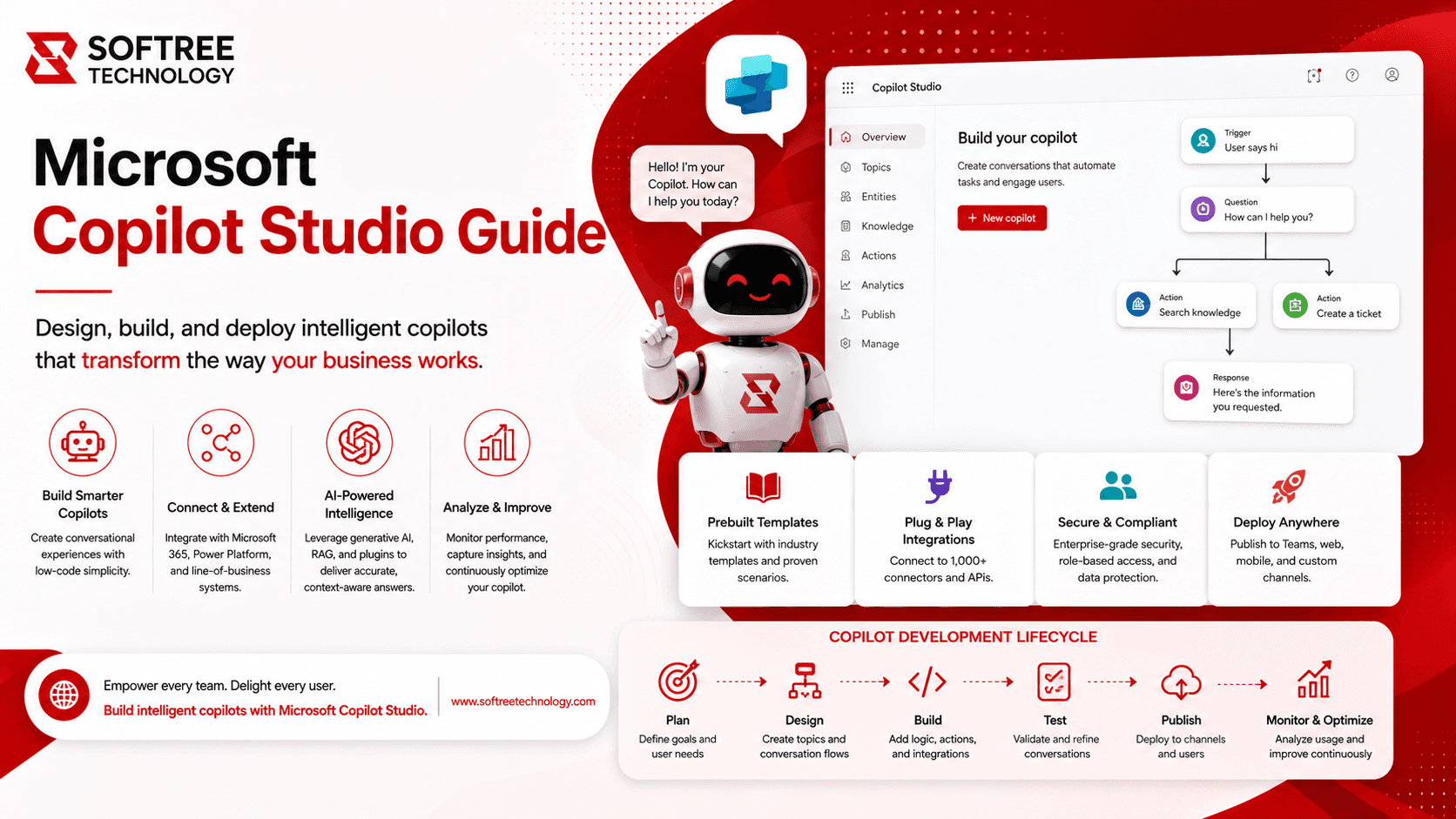
6. How Does Copilot Studio Development Work?
├── Step 1: Define the Business Objective
Identify users, problems, information requirements, required actions, restrictions, and success measures.
├── Step 2: Design and Configure the Agent
Define the Copilot's purpose, instructions, tone, responsibilities, boundaries, knowledge sources, tools, workflows, authentication, and escalation processes.
├── Step 3: Connect Knowledge and Business Systems
Connect SharePoint, business documents, websites, Dataverse, Microsoft 365, Dynamics 365, APIs, Power Automate, and external applications.
├── Step 4: Test, Deploy, and Optimize
Test response accuracy, knowledge retrieval, business actions, security, user experience, failures, and escalation scenarios before deployment.
└── Diagram / Process Flow / Visual
Business Requirement → AI Agent Strategy → Agent Design & Instructions → Knowledge + Business Data → Tools + Power Automate → Testing & Evaluation → Security & Governance → Deployment → Monitoring & Optimization
──────────────────────────────────────────────────────────────
7. Key Features / Components
├── Custom AI Agents
Specialized agents can be created for departments, business processes, customer journeys, and enterprise functions.
├── Enterprise Knowledge
Connect Copilots to SharePoint, business documents, websites, enterprise data, and organizational knowledge repositories.
├── Tools and Integrations
Copilots can call APIs, retrieve information, trigger Power Automate workflows, create or update records, and connect enterprise applications.
├── Power Platform Integration
Integrate Copilot Studio with Power Apps, Power Automate, Dataverse, and Power BI.
└── Security and Governance
Implement identity and access controls, data protection, environment governance, connector controls, authentication, monitoring, and responsible AI practices.
──────────────────────────────────────────────────────────────
8. Benefits of Custom Copilots
├── Benefit 1: Improved Employee Productivity
Help employees find information, understand policies, summarize content, and complete routine tasks.
├── Benefit 2: Better Customer Experience
Provide conversational assistance for common questions and service requests while escalating complex issues to human teams.
├── Benefit 3: Automated Business Processes
Support service requests, notifications, approval workflows, record updates, and request routing.
├── Benefit 4: Improved Knowledge Management
Provide conversational access to approved information across documents, SharePoint, applications, and internal repositories.
└── Benefit 5: Scalable Enterprise AI
Create specialized Copilots across departments while maintaining centralized governance and security.
──────────────────────────────────────────────────────────────
9. Common Use Cases
├── Use Case 1: HR Copilot
Support questions about policies, benefits, leave, onboarding, workplace guidelines, and HR processes.
├── Use Case 2: IT Helpdesk Copilot
Provide troubleshooting guidance, knowledge-base access, support requests, status checks, and escalation.
├── Use Case 3: Customer Service Copilot
Answer FAQs, provide product information, support service requests, retrieve customer information, and assist human representatives.
├── Use Case 4: Sales Copilot
Support product information, customer research, sales documentation, opportunities, meetings, and follow-ups.
├── Use Case 5: Knowledge Management Copilot
Provide conversational access to policies, procedures, training materials, technical documentation, and internal resources.
└── Use Case 6: Finance Copilot
Assist with invoice questions, expense processes, financial policies, approval workflows, and finance knowledge.
──────────────────────────────────────────────────────────────
10. Best Practices
├── Best Practice 1: Start With a Specific Business Problem
Define the problem, users, expected outcomes, and success metrics before development.
├── Best Practice 2: Use Trusted Knowledge Sources
Connect the agent to accurate, approved, and maintained enterprise information.
├── Best Practice 3: Define Clear Agent Instructions
Specify the Copilot's role, responsibilities, limitations, tone, and behavior.
├── Best Practice 4: Apply Appropriate Security
Use authentication, permissions, and access controls to restrict information appropriately.
├── Best Practice 5: Test With Real Scenarios
Test common questions, unexpected requests, incorrect inputs, and escalation scenarios.
├── Best Practice 6: Monitor and Improve
Track user feedback, response quality, failed interactions, and business outcomes.
└── Best Practice 7: Establish Governance Early
Define ownership, environment policies, data controls, security requirements, and deployment processes before scaling.
──────────────────────────────────────────────────────────────
11. Common Mistakes to Avoid
├── Mistake 1: Building Without a Clear Business Objective
An agent without a specific business purpose can result in low adoption and limited business value.
├── Mistake 2: Using Outdated Knowledge
Inaccurate or outdated knowledge sources can result in unreliable responses.
├── Mistake 3: Giving Excessive Permissions
Copilots should only access the information and tools required for their intended purpose.
├── Mistake 4: Skipping Testing
Realistic business scenarios must be tested before production deployment.
├── Mistake 5: Ignoring Human Escalation
Complex or sensitive requests may require human expertise.
└── Mistake 6: Scaling Too Quickly
Organizations should validate an initial Copilot, measure results, and establish governance before expanding.
──────────────────────────────────────────────────────────────
12. Key Takeaways
✓ Microsoft Copilot Studio enables organizations to build custom AI agents for specific business needs.
✓ Copilots can combine enterprise knowledge, AI capabilities, tools, workflows, and business applications.
✓ Common use cases include HR, IT, customer service, sales, finance, and knowledge management.
✓ Power Automate can extend Copilots from conversational assistance into business process automation.
✓ Security, governance, testing, and knowledge quality are essential for enterprise deployments.
✓ Organizations should begin with focused use cases and scale after demonstrating measurable business value.
──────────────────────────────────────────────────────────────
13. Conclusion
├── Summary
Microsoft Copilot Studio gives enterprises a practical way to build customized AI experiences around their business processes, knowledge, and applications.
├── Final Insight
Successful Copilot development requires clear business objectives, trusted knowledge, appropriate permissions, workflow integration, thorough testing, and governance before scaling.
Ready to build a custom AI Copilot? Partner with Softree Technology for Copilot strategy, conversational design, enterprise knowledge integration, Power Platform automation, security, governance, testing, and deployment.
Softree Technology: https://www.softreetechnology.com/