AI Workflow Automation with Microsoft Power Platform: Building Intelligent Business Operations
Learn how AI Workflow Automation with Microsoft Power Platform helps organizations reduce manual effort, improve productivity, and streamline business processes.
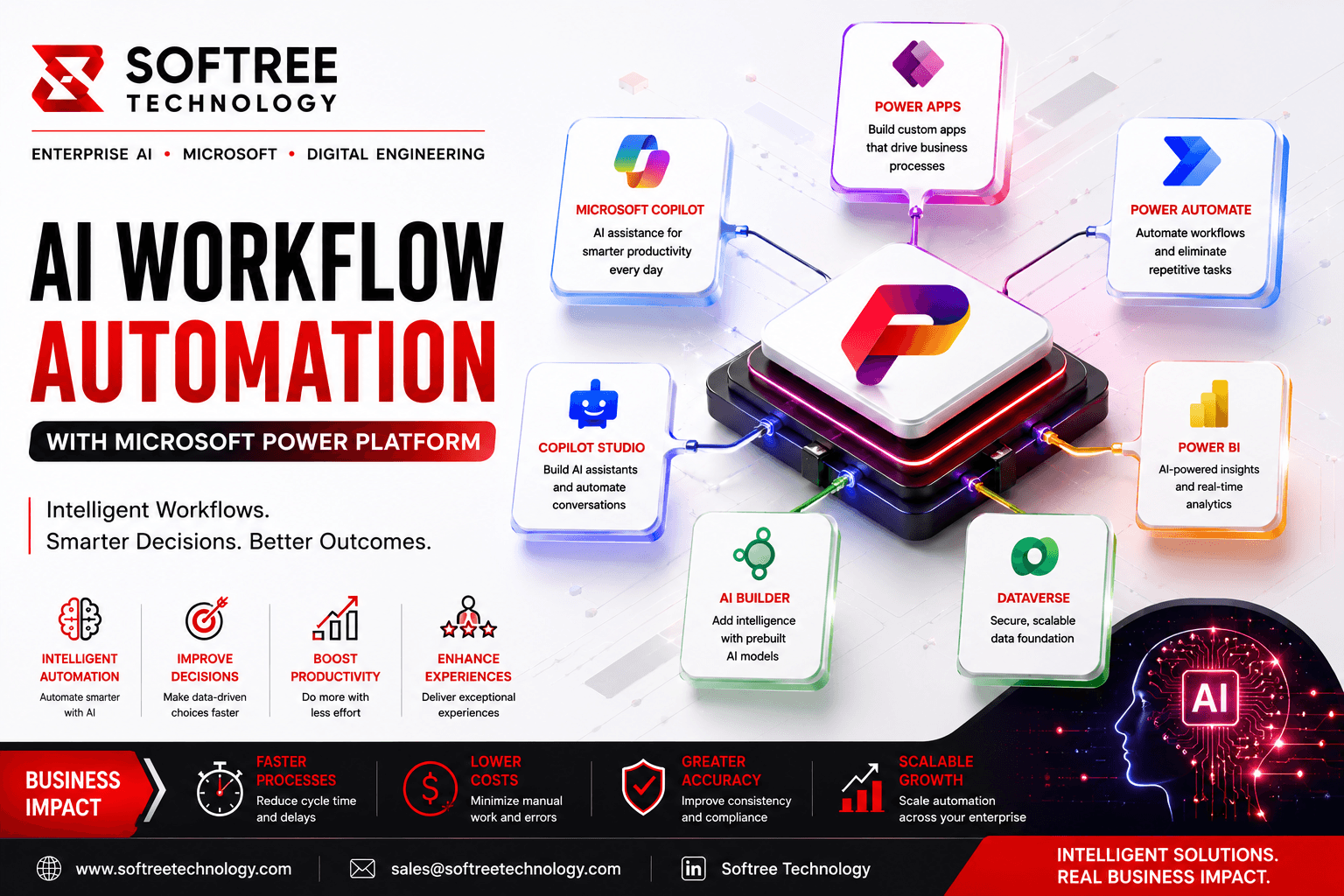
Introduction
AI Workflow Automation with Microsoft Power Platform
Introduction
Businesses today need faster, smarter, and more efficient ways to manage their operations. However, many organizations still rely on manual processes that can slow productivity, increase errors, and delay decision-making. AI Workflow Automation combines Artificial Intelligence with Microsoft Power Platform to automate repetitive tasks, improve operational efficiency, and support more intelligent business decisions.
By combining workflow automation with AI capabilities, organizations can move beyond simple rule-based processes and create workflows that can understand documents, analyze information, and support business decisions. This guide explores the challenges organizations face, how AI-powered automation can address these challenges, implementation approaches, real-world use cases, and best practices for successful adoption.
Understanding the Problem
Many organizations continue to depend on manual approvals, repetitive data entry, document handling, and disconnected business systems. These processes can require employees to spend significant time on routine activities, resulting in slower operations, higher costs, and limited visibility into business performance.
Key Challenges
Organizations commonly face challenges such as manual and repetitive business processes, slow approvals, time-consuming document handling, limited visibility into business performance, increased operational costs, and human errors. As business operations grow, these challenges can become more difficult to manage and can affect overall productivity and customer experience.
Why Traditional Automation Falls Short
Traditional rule-based automation is effective for predefined and predictable tasks, but it has limitations when processes require understanding or interpretation. A rule-based workflow can execute a specific action when a defined condition occurs, but it may not be able to understand documents, interpret natural language, analyze complex information, or provide intelligent recommendations.
AI-powered automation adds intelligence to these workflows through capabilities such as document processing, predictions, natural language understanding, and AI-assisted decision support. This allows organizations to automate processes that previously required greater levels of manual intervention.
Business Impact
AI Workflow Automation can help organizations improve employee productivity by reducing repetitive activities and allowing teams to focus on higher-value work. Faster workflow execution can support quicker decision-making, while reduced manual processing can help lower operational costs and minimize errors. Organizations can also use intelligent automation to improve customer experiences by responding to requests and processing information more efficiently.
Key Takeaways
AI adds intelligence to traditional workflow automation by enabling processes to understand information and support more complex activities. Microsoft Power Platform provides a low-code environment for building and scaling these automated workflows, while AI capabilities can make them more intelligent and adaptable.
Organizations can benefit from improved operational efficiency, greater accuracy, reduced manual effort, faster decision-making, and increased business agility when AI automation is applied to the right processes.
The Solution
Microsoft Power Platform provides a foundation for implementing intelligent workflow automation across business processes. Power Apps can be used to create business applications and user interfaces, while Power Automate manages workflow execution, approvals, notifications, and system integrations.
Microsoft Copilot and AI Builder can add AI capabilities to workflows, including intelligent assistance and AI-powered processing. Dataverse provides a secure environment for managing business data, while Power BI can be used to analyze workflow performance and provide operational reporting.
Together, these technologies allow organizations to connect business applications, workflows, AI capabilities, data, and analytics into a more connected automation environment.
Workflow
Business Process → Power Apps → Power Automate → AI Builder & Copilot → Dataverse → Power BI
This approach allows a business request to move through an automated workflow while AI capabilities assist with processing and decision-making, business data is maintained centrally, and performance can be monitored through analytics.
Implementation & Real-World Use Cases
Implementation Steps
Successful AI Workflow Automation starts by identifying business processes that are repetitive, time-consuming, or suitable for intelligent automation. Organizations should first understand the existing process and identify opportunities for improvement before building the automated solution.
Once the process is defined, applications and workflows can be developed using Power Apps and Power Automate. AI capabilities can then be integrated where intelligent document processing, analysis, predictions, or decision support can provide additional value.
After deployment, organizations can use Power BI to monitor workflow performance, understand operational results, and identify areas that require improvement. Continuous optimization ensures that automated workflows remain aligned with changing business requirements.
Common Use Cases
AI Workflow Automation can be applied across a wide range of business processes. Employee onboarding can be automated by coordinating HR activities, document collection, approvals, and employee tasks. Invoice processing can use AI capabilities to assist with document processing and information extraction before routing invoices through approval workflows.
In customer support, AI can help process customer requests, identify relevant information, and support faster responses. Document management can be improved through automated classification, processing, routing, and storage. Sales automation can support repetitive activities and help sales teams access and process information more efficiently.
Business Outcomes
The primary outcomes of AI Workflow Automation include reduced manual work, faster approvals, better operational visibility, and higher employee productivity. By automating repetitive activities and adding intelligence to business workflows, organizations can improve how work moves across departments and systems.
Best Practices
Organizations should begin with high-impact business processes where automation can provide measurable value. Before introducing automation, existing workflows should be reviewed and optimized to remove unnecessary steps and improve the underlying process.
Security and governance should also be considered during implementation. Organizations need appropriate controls around business data, applications, AI capabilities, and workflow access. After deployment, workflows should be continuously monitored and improved based on performance, user feedback, and changing business requirements.
Future Trends
AI Workflow Automation is expected to continue evolving as organizations adopt more intelligent business technologies. AI-powered copilots can provide employees with contextual assistance within business processes, while hyperautomation combines multiple automation technologies to automate broader workflows.
Predictive workflows can use AI to identify potential outcomes and support proactive actions. At the same time, industry-specific AI solutions can provide automation capabilities designed around the unique requirements of sectors and business functions.
Expert Insight
Successful AI Workflow Automation starts with solving real business problems rather than attempting to automate every task. Organizations should identify processes where AI and automation can deliver measurable improvements and then build solutions around those requirements.
By combining Microsoft Power Platform with AI capabilities such as Copilot and AI Builder, organizations can improve efficiency, reduce manual effort, and scale automation while continuing to leverage their existing Microsoft ecosystem.
Conclusion
AI Workflow Automation can help organizations streamline operations, reduce manual effort, and make faster, data-driven decisions by combining intelligent AI capabilities with automated business workflows. From employee onboarding and invoice processing to customer support, document management, and sales automation, organizations can use AI to improve processes that traditionally depend heavily on manual work.
The goal is not simply to automate more tasks but to create smarter business workflows that connect applications, data, employees, and AI capabilities. Organizations that start with high-impact processes, establish appropriate governance, and continuously monitor and optimize their workflows can build a stronger foundation for long-term digital transformation.
If your organization is looking to modernize business processes, implement AI-powered workflow automation, or improve operational efficiency, Softree Technology can help design and implement AI automation solutions aligned with your business and technology requirements.
Learn more about AI Workflow Automation solutions from Softree Technology.
Frequently Asked Questions.
Question Answer:
AI Workflow Automation combines artificial intelligence with workflow automation tools to automate repetitive tasks, improve decision-making, and streamline business processes with minimal manual intervention.
Question Answer:
Microsoft Power Platform integrates Power Apps, Power Automate, AI Builder, Microsoft Copilot, Dataverse, and Power BI to build intelligent, low-code automation solutions for business processes.